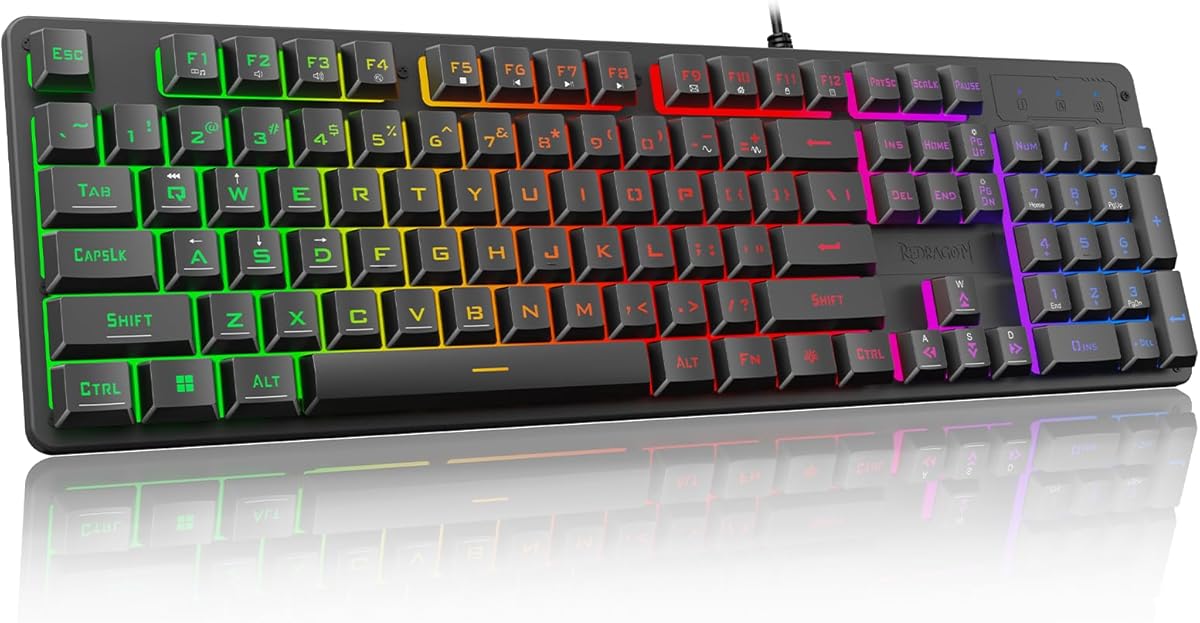
Redragon K521 Upgrade
4.4Editor score
Mechanical Feeling Keys
Rainbow LED Backlighting
19-Key Anti-Ghosting
Discover the top keyboards for Rainbow Six Siege. This guide compares ten top models for speed, durability, and customization to elevate your tactical gameplay
Choosing the right keyboard for Rainbow Six Siege can significantly impact your tactical performance and reaction times. The best models offer responsive switches, durable construction, and customizable lighting to suit intense gaming sessions.
We evaluated ten leading keyboards based on switch type, build quality, layout, and feature sets relevant to competitive FPS play. Our analysis focuses on how each model supports precision input and comfort during long matches.
Each pick highlights specific strengths and potential trade-offs to help you find the ideal match for your setup. Note that prices and availability may change, so verify current details before purchasing to ensure the best value.
4.4Editor score

4.6Editor score

4.6Editor score
The following table provides a side-by-side comparison of all ten keyboards reviewed in this guide. Each entry highlights key specifications to help you quickly identify the model that best fits your gaming needs and budget constraints.



The ASUS ROG Strix Scope II 96 Wireless stands out as the top choice for Rainbow Six Siege players seeking a premium balance of performance and versatility. With a rating of 4.6 stars, it offers a 96% layout that saves space while retaining a number pad for utility tasks. Its tri-mode connectivity ensures seamless switching between devices without latency issues during critical matches.
We may earn a commission when you buy through this link, at no additional cost to you.
Key strengths include hot-swappable ROG NX Snow linear switches that provide smooth, consistent actuation ideal for rapid peeking and shooting. The integrated sound-dampening foam reduces noise, keeping focus on in-game audio cues. PBT keycaps resist wear over time, maintaining legibility even during intense gaming sessions. Macro programmability allows precise control over game-specific commands.
While the price is higher than budget options, the durability and feature set justify the investment for serious gamers. Some users may find the software interface complex initially, but it offers deep customization once mastered. The wireless connection remains stable even under high load, ensuring no input lag affects your tactical decisions.
This keyboard is perfect for players who value both performance and convenience in a compact form factor. Whether you are playing ranked matches or streaming, its reliability and comfort support extended use. We recommend it as the best overall choice for those willing to invest in a top-tier peripheral.
For those prioritizing long-term value, the build quality and switch customization options provide lasting satisfaction. The ergonomic design with adjustable tilt positions ensures comfort during long raid sessions. This model effectively bridges the gap between full-size functionality and space-saving design.
Integrated sound-dampening foam absorbs pinging noises to improve keystroke acoustics, helping you hear vital game audio.
Tri-mode connectivity including 2.4GHz wireless ensures reliable performance suitable for competitive FPS gameplay.
We may earn a commission when you buy through this link, at no additional cost to you.
The Corsair K55 RGB PRO offers an affordable entry point for players needing reliable performance without breaking the bank. Rated 4.4 stars, it features a membrane design that provides quiet operation while maintaining responsive input. The six dedicated macro keys allow quick access to in-game commands like voice chat or reload shortcuts.
We may earn a commission when you buy through this link, at no additional cost to you.
Its IP42-rated protection guards against spills and dust, ensuring longevity even in casual gaming environments. The detachable palm rest adds comfort for extended sessions, reducing hand strain during long tactical operations. RGB lighting can be customized via iCUE software to match your setup aesthetics.
While membrane switches lack the tactile feedback of mechanical options, they remain sufficient for casual players. The need for software to unlock full macro features might be a hurdle for some. However, the build quality is solid for the price range, offering good durability.
This keyboard is ideal for budget-conscious gamers who prioritize durability and macro functionality. It serves well as a secondary keyboard or for those transitioning from standard typing boards. We recommend it for its balance of features and cost-effectiveness.
The design ensures practical usability without demanding excessive desk space. Its straightforward layout helps new users adapt quickly to gaming inputs. Overall, it delivers consistent performance suitable for everyday use.
Six dedicated macro keys enable instant command execution through iCUE software for streamlined gameplay.
IP42-rated protection safeguards the keyboard against accidental liquid spills to extend device life.
We may earn a commission when you buy through this link, at no additional cost to you.
The Redragon K521 Upgrade delivers exceptional value for players seeking mechanical-like performance at a minimal cost. With a 4.4-star rating, it features keys designed to mimic the tactile feedback of mechanical switches without the high price. The 19-key anti-ghosting ensures accurate input during complex combos common in tactical shooters.
We may earn a commission when you buy through this link, at no additional cost to you.
One-touch lighting controls simplify brightness adjustments and mode changes during gameplay. The 12 multimedia keys enhance efficiency for both gaming and office use. Compatibility across multiple platforms including consoles makes it versatile for various setups. The rainbow backlighting adds visual appeal to your desk.
Though it uses membrane switches with mechanical styling rather than true mechanical units, the experience is satisfying for casual gamers. The build feels sturdy enough for regular use but lacks the longevity of premium models. Noise levels are moderate, suitable for shared spaces.
This model is perfect for students or budget gamers needing a reliable upgrade from standard keyboards. It provides essential gaming features without unnecessary complexity. We recommend it for its unbeatable price-to-performance ratio.
Simple plug-and-play functionality means no drivers are needed to start using it immediately. The layout accommodates standard workflows while adding gaming enhancements. It remains a strong contender for entry-level mechanical experience seekers.
Keys are designed for mechanical feel offering fast tapping and quick input triggering for gaming.
One-touch on-off lighting button and adjustable brightness modes add visual customization ease.
We may earn a commission when you buy through this link, at no additional cost to you.
The AULA F75 Pro Wireless combines custom keyboard appeal with gaming performance in a compact 75% layout. Rated 4.6 stars, it features a hot-swappable base allowing easy switch changes without soldering. The tri-mode connection supports Bluetooth, 2.4GHz wireless, and USB-C for versatile use across devices.
We may earn a commission when you buy through this link, at no additional cost to you.
Pre-lubed Reaper switches provide smooth keystrokes ideal for rapid inputs during Siege matches. The multi-function knob adjusts brightness or volume quickly, streamlining workflow without menu diving. Side-printed PBT keycaps offer durability and a unique aesthetic that resists fading over time.
While the compact design saves desk space, the lack of a number pad may affect users needing numeric input. The battery life is impressive for wireless use but requires occasional recharging. Build quality feels robust with good structural stability for gaming.
This keyboard suits enthusiasts looking to customize their setup without full mechanical complexity. It bridges the gap between custom boards and plug-and-play peripherals. We recommend it for its innovation and versatile connectivity options.
The driver allows macro programming to enhance gameplay efficiency significantly. The RGB lighting adds visual flair matching other peripherals easily. It delivers strong performance for both work and play scenarios.
Hot-swappable base supports 3-pin or 5-pin switch replacement for DIY customization without soldering.
Supports Bluetooth 5.0, 2.4GHz wireless, and USB-C for connecting up to five devices.
We may earn a commission when you buy through this link, at no additional cost to you.
The SteelSeries Apex 3 offers a quiet gaming experience suited for shared environments. With a 4.6-star rating, its whisper quiet gaming switches provide low-friction inputs while minimizing noise. The IP32 water resistance protects against accidental spills ensuring durability in daily use.
We may earn a commission when you buy through this link, at no additional cost to you.
A premium magnetic wrist rest supports full palm comfort during long matches. The 10-zone RGB illumination allows visual personalization without full per-key control. Dedicated multimedia controls let you adjust volume and settings on the fly without interrupting gameplay.
While it uses membrane technology rather than mechanical, the switches maintain consistent performance for casual to mid-tier play. The wrist rest is comfortable but adds height to the setup. Build quality feels sturdy for the price range.
This keyboard is ideal for noise-sensitive gamers or office hybrids. Its broad compatibility with consoles and PCs adds value for multi-device users. We recommend it for its comfort and quiet performance.
The layout supports standard workflows while integrating gaming features. RGB software expands customization options for dedicated users. It provides reliable performance for entry-level competitive needs.
Whisper quiet gaming switches ensure nearly silent use during intense gameplay.
IP32 water resistance prevents accidental damage from liquid spills to extend device life.
We may earn a commission when you buy through this link, at no additional cost to you.
The Razer Ornata V3 combines low-profile comfort with satisfying feedback in a sleek design. Rated 4.5 stars, it uses mecha-membrane switches to fuse mechanical feel with membrane reliability. The slimmer keycaps and shorter switches reduce hand strain during extended typing or gaming.
We may earn a commission when you buy through this link, at no additional cost to you.
UV-coated keycaps ensure legends remain visible and durable against wear. The magnetic soft touch wrist rest provides ample support for wrists vital during long periods. Dedicated media keys allow quick adjustments to brightness and volume without disrupting games.
While switches are non-replaceable, the hybrid design offers a unique tactile experience suitable for mixed work and play. The low profile makes it ideal for users preferring a compact feel. Build quality aligns with Razer standards for durability.
This keyboard suits gamers wanting mechanical feedback without the bulk. Its ergonomic design supports natural hand positioning reducing fatigue over time. We recommend it for comfort-focused players.
The layout supports essential gaming functions without extra bulk. It works seamlessly with existing setups. It provides a balance of style and practicality for daily use.
Slimmer keycaps and shorter switches allow natural hand positioning with little strain.
UV coating ensures fade-resistant legends and protection against frequent use wear.
We may earn a commission when you buy through this link, at no additional cost to you.
The Logitech G413 TKL SE delivers robust mechanical performance in a compact tenkeyless design. With a 4.6-star rating, it features tactile mechanical switches that provide consistent actuation and feedback. The PBT keycaps are heat- and wear-resistant ensuring long-lasting legends and texture.
We may earn a commission when you buy through this link, at no additional cost to you.
A premium brushed aluminum top case elevates durability and aesthetics while resisting flex during typing. White LED lighting highlights keys without RGB complexity. FN key media controls let you manage volume and playback efficiently during matches.
The lack of RGB may disappoint users wanting customization but keeps costs reasonable. The tenkeyless layout saves space for mouse movement which benefits FPS players. Build quality is solid with minimal flex for reliable input.
This keyboard suits gamers prioritizing reliability and simplicity over flashy features. It delivers consistent performance without bloat. We recommend it for clean setups and mechanical fans.
The layout supports standard workflows without extra bulk. It pairs well with various desk configurations. It provides excellent durability for daily use.
PBT keycaps resist heat and wear ensuring longevity during gaming sessions.
Compact layout provides space for mouse movement ideal for FPS gaming.
We may earn a commission when you buy through this link, at no additional cost to you.
The ASUS ROG Strix Scope II X provides premium full-size performance for those needing all keys. Rated 4.5 stars, it offers hot-swappable ROG NX Snow V2 linear switches for smooth typing and gaming. The aluminum top plate and PBT keycaps give it a weighty durable presence.
We may earn a commission when you buy through this link, at no additional cost to you.
Integrated sound-dampening foam absorbs pinging noises improving keystroke acoustics. All keys are macro-programmable for advanced customization of commands. A multi-function wheel allows intuitive media and lighting adjustments without software.
While it lacks wireless options, the wired USB-C connection ensures stable low-latency input. The full layout is ideal for users requiring number pad support for data entry. Build quality is top-tier with minimal flex under pressure.
This keyboard is perfect for professionals who also game and need a single solution. The customization depth supports complex workflows. We recommend it for its build and feature set.
The detachable wrist rest ensures ergonomic comfort during long sessions. It supports standard workflows without extra bulk. It offers robust reliability for heavy daily use.
Full-Size layout with number pad supports all standard input needs.
Integrated sound-dampening foam improves keystroke acoustics by absorbing noise.
We may earn a commission when you buy through this link, at no additional cost to you.
The Razer BlackWidow V4 X offers silent linear performance with six macro keys for tactical play. With a 4.5-star rating, its yellow mechanical switches deliver rapid-fire inputs without loud clicks. Per-key Chroma RGB lighting allows deep customization matching game effects.
We may earn a commission when you buy through this link, at no additional cost to you.
Built-in sound dampeners and special foam under the circuit board ensure satisfying acoustics. Double-shot ABS keycaps resist wear but may shine after extended use. Dedicated macro keys expand command options for complex builds.
The compact profile supports standard gameplay without excess space. It integrates well into Razer ecosystems for unified lighting control. Build quality is solid though ABS keycaps may require replacement eventually.
This keyboard suits gamers wanting mechanical feedback without noise. The macro support enhances productivity. We recommend it for its feature set and brand ecosystem.
The design supports standard workflows while enhancing gaming experience. It offers reliable performance for daily needs. It remains a strong option for silent tactile fans.
Yellow mechanical switches offer zero distance between actuation and reset points for rapid inputs.
Per-key RGB lighting supports over 16.8 million colors and dynamic effects.
We may earn a commission when you buy through this link, at no additional cost to you.
The Aula WIN60 HE leverages Hall Effect magnetic switches for unmatched precision and speed. Rated 4.5 stars, it offers 8000Hz polling rates ensuring minimal latency. The rapid trigger mode with 0.02mm RT step distance enables lightning-fast response for shooting and combos.
We may earn a commission when you buy through this link, at no additional cost to you.
Its compact 60% design saves significant desk space ideal for FPS gamers needing room. The web-based driver allows easy remapping and macro creation without bulky software. RGB lighting illuminates PBT keycaps for aesthetic appeal.
While the lack of numpad and arrow keys may inconvenience some, it enhances portability. The magnetic switches eliminate wear from physical contact for longevity. This model is built for competitive scenarios demanding high performance.
This keyboard is perfect for players seeking a hardware edge. The customization is accessible through browser tools. We recommend it for speed-focused competitive users.
The layout is optimized for fast inputs and quick movement. It pairs well with minimalist setups. It delivers exceptional performance for serious gamers.
Magnetic technology ensures precise consistent actuation without physical contact wear.
0.02mm RT step distance ensures lightning-fast response for rapid shooting.
We may earn a commission when you buy through this link, at no additional cost to you.
Selecting the right keyboard involves balancing switch type, layout, connectivity, and durability. This guide breaks down essential factors to help you make an informed decision.
Switches determine the feel and responsiveness of your input. Linear switches offer smooth travel ideal for rapid inputs, tactile switches provide feedback, and clicky switches add audible confirmation. For Siege, linear or tactile options generally help maintain focus on audio cues.
Choose switches that match your preference for feedback and noise levels during play.
Layout size impacts desk space and hand positioning. Full-size keyboards include numpads but reduce mouse room. TKL and compact layouts like 60% or 75% save space and improve ergonomics for FPS gaming.
Consider your desk size and whether you need a number pad for other tasks.
Connectivity options include wired, wireless, or tri-mode. Wired ensures zero latency but limits movement. Wireless offers freedom but check for latency issues. Tri-mode provides flexibility across multiple devices.
Prioritize low-latency wireless if you prefer cable-free setups for competitive play.
Durability includes build materials and switch longevity. PBT keycaps resist wear better than ABS. Hot-swappable bases allow future upgrades without replacing the whole unit. Check IP ratings for spill resistance.
Invest in durable materials to ensure longevity and reduce replacement costs.
Customization ranges from RGB lighting to macro keys and software programming. Look for models with dedicated macro keys or robust drivers that let you bind complex commands.
Prioritize keyboards with strong software support for advanced gameplay needs.
Comfort reduces fatigue during long sessions. Ergonomic designs, wrist rests, and low-profile keys can help maintain posture. Adjustable tilt positions also contribute to comfort.
Ensure the keyboard supports extended use without causing strain.
Prices vary widely based on features and brand. Budget options offer basic functionality while premium models provide advanced customization. Determine how much value you place on durability and features.
Balance your budget with long-term needs to find the best value.
Compatibility ensures the keyboard works with your system. Check support for your OS and consoles. Some models include driver software that may require specific platforms.
Verify system requirements to avoid integration issues.
Begin by connecting the keyboard to your system and installing any required drivers. Configure macro keys and RGB lighting to match your gameplay needs.
Keep the keyboard clean by wiping it regularly with a dry cloth and using compressed air to remove dust. Replace keycaps if they show signs of wear.
If using a wireless model, charge it regularly and monitor battery levels to avoid interruptions. Store the keyboard in a dry place to ensure longevity.
Linear switches like Razer Yellow or ROG NX Snow are preferred for smooth, silent inputs. Tactile options are also acceptable if you like feedback without excessive noise.
Modern wireless with 2.4GHz and 8000Hz polling offers near-wired performance. Ensure your setup supports the protocol to avoid latency issues.
Wipe your keyboard weekly and use compressed air monthly to remove dust. Deep cleaning can be done every few months to maintain hygiene and function.
No, Siege does not require a numpad. TKL or compact layouts provide more mouse space which benefits aiming and movement.
Hot-swappable switches allow you to change switch types without soldering. This extends the keyboard life and lets you customize the feel as you prefer.
Membrane switches work for casual play but mechanical options offer better responsiveness. Choose based on your performance needs and budget.
Our top pick, the ASUS ROG Strix Scope II 96 Wireless, excels in performance and flexibility. Budget seekers will appreciate the Redragon K521 Upgrade for value.
Prioritize switch type and layout based on your gameplay style and desk space. Durability and comfort matter just as much for long-term enjoyment.
Prices and availability change frequently so verify details before purchase. With the right keyboard, you can maximize your tactical edge in every match.