
Lenovo Smartcard Wired Keyboard II
4.4Editor score
Compact lightweight design
Secure PIN entry
USB connectivity
Discover the top 10 best keyboards with smart card readers for secure authentication. We compare features, security standards, and comfort for professionals.
Finding a reliable keyboard with smart card reader is essential for secure work environments. These devices combine typing comfort with integrated authentication hardware to protect sensitive data and streamline login processes effectively.
We evaluated ten leading models based on security compliance, ergonomic design, and build quality. Our comparison highlights key specifications like TAA compliance, smartcard standards, and usability factors for enterprise and personal use cases.
Each pick below showcases unique strengths for different user needs and budgets. Prices and availability change frequently, so please verify current details before purchasing to ensure you get the best value for your specific setup.
4.4Editor score
4.6Editor score

4.1Editor score
This side-by-side comparison outlines the key specifications and unique features of each model to help you choose the right secure keyboard for your needs.


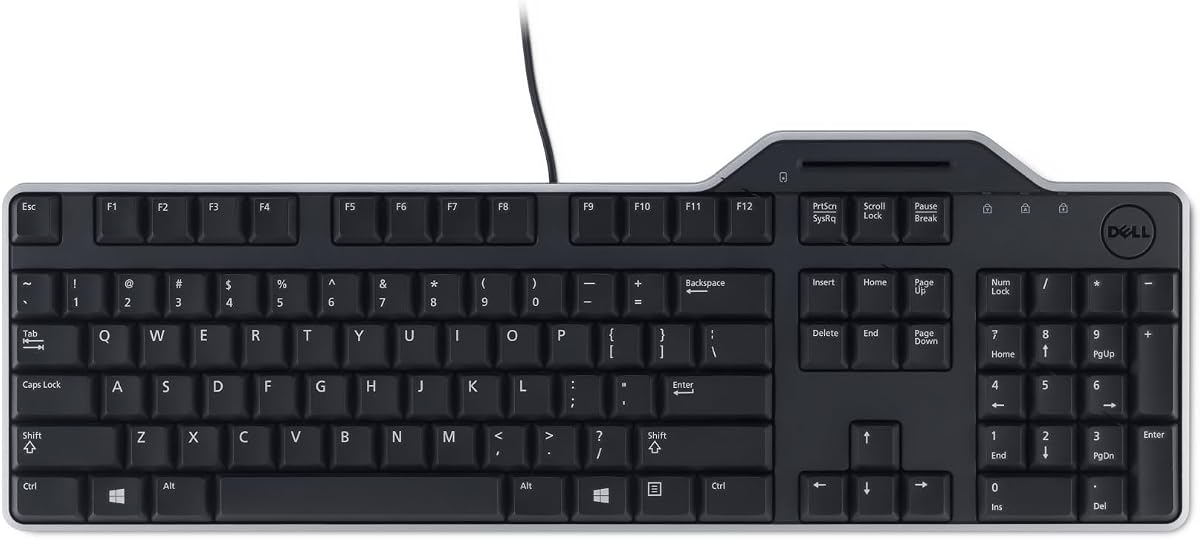
The Dell KB813 stands out as a top choice for secure workstations. It combines a full-featured typing experience with an integrated smartcard reader to streamline login processes and enhance security protocols effectively.
We may earn a commission when you buy through this link, at no additional cost to you.
Its spill-resistant design ensures longevity even in busy office environments. The ergonomic layout includes a detachable palm rest to reduce strain during long sessions. Quiet keys make it ideal for shared spaces where noise is a concern.
While it lacks advanced customization, the core functions are reliable. The USB connection is straightforward and works seamlessly with Dell systems. This balance of security and comfort makes it a strong recommendation for most users.
If you need a dependable keyboard with secure authentication, this model delivers. It is particularly suited for enterprise settings where durability and ease of use are prioritized over gaming features.
The built-in reader supports ISO7816 standards for secure authentication across multiple platforms and applications.
The low-profile keys and detachable rest promote natural hand positioning to reduce fatigue.
We may earn a commission when you buy through this link, at no additional cost to you.
The Adesso TruForm is designed for organizations requiring strict compliance. It is a TAA-compliant device that brings robust security features suitable for government and enterprise needs.
We may earn a commission when you buy through this link, at no additional cost to you.
Its split ergonomic design encourages a natural hand position to reduce strain. The integrated palm rest supports wrists effectively during extended use. Hotkeys provide quick access to tools without leaving the keyboard.
While the split layout may take time to adjust to, the comfort benefits are significant. The smartcard reader adheres to multiple international standards ensuring broad compatibility across different systems.
Choose this model if you prioritize ergonomic health and regulatory compliance. It is ideal for government agencies and large enterprises that need secure and comfortable input devices.
Built to meet U.S. Trade Agreement Act specifications for government procurement and vendor requirements.
The split zones and gentle slope minimize wrist deviation and joint pressure.
We may earn a commission when you buy through this link, at no additional cost to you.
Cherry is known for quality and this KC 1000 delivers secure authentication. It features a wired security keyboard with an integrated chip card terminal for secure PIN entry and reliable connectivity.
We may earn a commission when you buy through this link, at no additional cost to you.
It supports multiple protocols including T=0 and T=1 ensuring compatibility with various smartcards. The thin design keeps the desk uncluttered. Driver support extends to Windows, Mac, and Linux systems for broad utility.
The one-handed operation of the smart card module adds convenience for users who need to type while authenticating. While it lacks multimedia features its focus on security makes it stand out.
This keyboard is perfect for IT professionals requiring high standards of data protection. It balances security and usability effectively for environments where safety is critical.
FIPS 201 and EMV approvals ensure the highest standards of secure data transmission.
Drivers for major operating systems ensure seamless integration into mixed work environments.
We may earn a commission when you buy through this link, at no additional cost to you.
The Adesso EasyTouch 130SB brings mechanical durability to secure workstations. It features red mechanical switches rated for 50 million keystrokes making it suitable for intensive daily use.
We may earn a commission when you buy through this link, at no additional cost to you.
A dedicated Copilot AI hotkey provides instant access to Microsoft tools without navigating menus. This productivity boost is combined with a built-in smartcard reader for secure banking and logon processes.
The 2X large print keycaps improve legibility especially in low light conditions. Full size layout includes internet and multimedia hotkeys for convenience. USB connectivity ensures stable data transfer speeds.
Choose this keyboard if you prefer mechanical feedback and modern AI tools. It is a strong choice for developers or users who need both high typing performance and security.
The Copilot hotkey streamlines creative and coding tasks directly from the keyboard.
Large print keycaps make symbols and letters easier to read for all users.
We may earn a commission when you buy through this link, at no additional cost to you.
The Dell Keyboard Smartcard USB offers a straightforward solution for secure entry. It provides reliable wired USB connectivity and a comfortable full-size layout with a detachable palm rest for extended comfort.
We may earn a commission when you buy through this link, at no additional cost to you.
Its spill-resistant design protects against accidental beverage mishaps. The quiet keys ensure minimal distraction during meetings. The smartcard reader enhances security without adding extra cables or devices to your desk.
This model prioritizes reliability and comfort over extra features. It is an excellent choice for office environments where simplicity and durability are key requirements for daily operations.
If you want a no-fuss keyboard with security features this model fits well. It is particularly suitable for users who value quiet typing and ergonomic support.
Dell's reputation for quality ensures this keyboard handles daily office tasks without issues.
Competitive pricing makes secure authentication accessible for smaller teams and businesses.
We may earn a commission when you buy through this link, at no additional cost to you.
Kensington KB201C is designed for organizations requiring robust security measures. It is TAA compliant and supports CAC credentials making it suitable for federal government institutions and regulated organizations.
We may earn a commission when you buy through this link, at no additional cost to you.
The quiet-click keyboard enhances focus and productivity without disturbing colleagues. Wired USB-A connection ensures reliable performance without battery needs. It is compatible with Windows macOS and ChromeOS systems.
A 3-year limited warranty adds peace of mind for long-term use. While design is functional rather than stylish its focus on security and compliance is clear. This makes it a dependable choice for specific sectors.
Select this keyboard if your organization mandates TAA compliance or CAC support. It is a professional tool built to meet strict regulatory and quality standards.
Ensures secure access with FIPS-201 and PC/SC standards for robust data protection.
A three-year warranty provides added value and support for enterprise clients.
We may earn a commission when you buy through this link, at no additional cost to you.
The Lenovo Smartcard Wired Keyboard II offers security at an accessible price point. It is designed for business use with reliable USB connectivity and secure smartcard integration for protected logons.
We may earn a commission when you buy through this link, at no additional cost to you.
Its lightweight design makes it easy to move between workstations. The secure PIN entry helps maintain data safety without complex software. This model is ideal for teams needing a large number of secure units quickly.
While it lacks extra features it covers the basics effectively. Lenovo ensures quality and reliability in its business class hardware. It delivers secure typing without unnecessary cost or complexity for users.
Choose this if you need a budget-friendly secure solution for many users. It is perfect for shared workspaces or temporary setups requiring immediate security.
Delivers essential smartcard protection without breaking the budget for larger organizations.
Lenovo's business class build quality ensures stable performance in office environments.
We may earn a commission when you buy through this link, at no additional cost to you.
HP USB Business Slim fits neatly on desks with a slim profile. It features a built-in spill drain to protect electronics from liquid damage. The smartcard reader supports secure authentication efficiently.
We may earn a commission when you buy through this link, at no additional cost to you.
Membrane switches provide a quiet typing experience. LED indicators show key states clearly. Wired USB connectivity ensures stable data transfer without latency issues for business applications.
This keyboard is designed for clean and tidy workstations where space is limited. It prioritizes practical durability with its drain feature and slim layout. It is suitable for standard office tasks.
Pick this if you need a compact and durable keyboard. The spill protection is a major plus for shared environments where accidents might happen.
The slim design preserves desk space and keeps the workstation organized.
Built-in spill drainage protects internal components from common liquid accidents.
We may earn a commission when you buy through this link, at no additional cost to you.
The Cherry Secure Board 1.0 is an intelligent security keyboard with integrated NFC and RF capabilities. It supports secure mode with authentication and encryption especially for thin clients and high-security zones.
We may earn a commission when you buy through this link, at no additional cost to you.
Its PC/SC smart card reader works with ISO 7816 and ISO 14443 compliant cards. This versatility allows it to read various smartcards and tags effortlessly. The wired USB connection ensures stable performance.
GS Approval indicates it meets strict quality and safety standards. While it is specialized its robust security features make it valuable for critical infrastructure. The black design is professional and unobtrusive.
Choose this if your environment requires NFC capabilities or high-security protocols. It is ideal for organizations managing access control and sensitive data entry.
Integrated RF/NFC interface supports modern contactless smartcards and tags.
GS Approval ensures the device meets rigorous safety and operational standards.
We may earn a commission when you buy through this link, at no additional cost to you.
The NEW OEM Dell KB813t is a direct replacement for Dell systems. It is a brand new unopened keyboard featuring a USB English layout and integrated smart card reader for secure logins.
We may earn a commission when you buy through this link, at no additional cost to you.
This OEM-grade hardware ensures compatibility with Dell computers. It is designed to deliver the same performance and reliability as the original equipment. The secure card reader adds an extra layer of safety.
While listing is generic the product matches Dell specifications closely. This makes it a cost-effective choice for businesses needing multiple units. It is ideal for bulk purchases and system refreshes.
Select this if you need a reliable OEM keyboard for replacement needs. It provides essential security features without the cost of premium branded options.
Designed to fit Dell systems seamlessly ensuring plug-and-play reliability.
Sold as new unopened items guaranteeing the latest packaging and warranty status.
We may earn a commission when you buy through this link, at no additional cost to you.
Selecting the right secure keyboard involves assessing compliance, ergonomics, and technical standards to meet your organization's security needs.
Look for keyboards supporting common protocols like FIPS 201 PC/SC and ISO 7816. These standards ensure the reader works with secure IDs and government credentials effectively.
Prioritize models with clear security certifications to ensure data protection and regulatory compliance.
If you work in government or regulated industries check for TAA compliance. This ensures the device meets sourcing standards for federal procurement and legal use.
Always verify compliance details with the manufacturer or product documentation before purchasing.
Choose keyboards with palm rests ergonomic layouts or quiet keys. Comfort features reduce strain during long typing sessions and improve overall user experience.
Consider split designs if you frequently type for extended periods to prevent wrist fatigue.
Most smartcard keyboards use wired USB connections for reliability and security. Ensure the connector type matches your system ports to avoid compatibility issues.
Wired connections are generally preferred in secure environments to reduce wireless vulnerabilities.
Durability is key in office settings. Look for spill-resistant designs or durable materials that can withstand daily wear and tear in busy environments.
High-quality build ensures the keyboard lasts longer and remains functional after accidents.
Check if the keyboard includes a numeric keypad or multimedia hotkeys based on your needs. Full-size layouts improve productivity for data-heavy tasks.
Decide if you need extra keys like Copilot AI or large print for accessibility.
Prices vary from affordable OEM models to premium ergonomic options. Set a budget that balances cost with essential security and comfort features.
Invest in higher quality if you use the keyboard daily for security purposes.
Ensure the driver supports your operating system including Windows macOS or Linux. Compatible drivers guarantee smooth smartcard authentication without errors.
Check product specs for listed OS compatibility before finalizing your purchase.
Start by installing any necessary drivers provided by the manufacturer. Plug the USB connector into your computer to ensure the smartcard reader and keys are recognized.
Insert your smartcard gently into the reader slot before typing. Follow on-screen prompts for PIN entry to authenticate securely and unlock your system or application.
Keep the keyboard clean with a dry cloth to prevent dust buildup. Avoid liquid spills by using a spill-resistant model or placing a protective mat nearby.
It combines standard typing with secure authentication. Users insert a smartcard to log in or authorize transactions without extra devices.
Most support Windows but many modern models also include Mac and Linux drivers. Check compatibility before buying.
No most use wired USB connections for power. This eliminates the need for charging or batteries.
Use compressed air and a soft cloth. Avoid liquids entering the reader slot to prevent damage.
It is a federal standard for secure identification devices. It ensures the card reader meets government security requirements.
Yes if the card meets ISO 7816 standards. Ensure your organization's card is supported by the reader protocols.
Our top picks like the Dell KB813 and Adesso TruForm offer robust security and comfort for most users. Each model brings unique strengths to enterprise and personal workflows.
Prioritize security compliance and ergonomic design when deciding. These factors ensure both protection and long-term comfort for your team.
Always check current prices and availability as deals may change. Verify compatibility with your existing systems before finalizing your order.