
Penitue 2pcs Mini Portable Laptop Stand
4.6Editor score
Zinc alloy durable material
Compact foldable design
Anti-slip stickers included
Finding the right laptop kickstand can transform your workspace comfort and productivity. A good stand elevates your screen to eye level, reducing neck strain and improving airflow for better cooling during long sessions.
We compared ten top-rated portable stands based on material quality, adjustability, and user feedback. Each option offers unique benefits like invisibility, magnetic mounts, or adjustable heights to suit different needs and budgets.
Every pick below highlights specific strengths and ideal use cases to help you choose confidently. Note that prices and availability may change over time, so check current listings before purchasing your preferred model.
4.6Editor score

4.6Editor score

4.7Editor score
As an Amazon Associate we earn from qualifying purchases.
This table provides a side-by-side comparison of all ten featured laptop kickstands. Review key specifications like material, weight, and compatibility to find the perfect match for your setup.

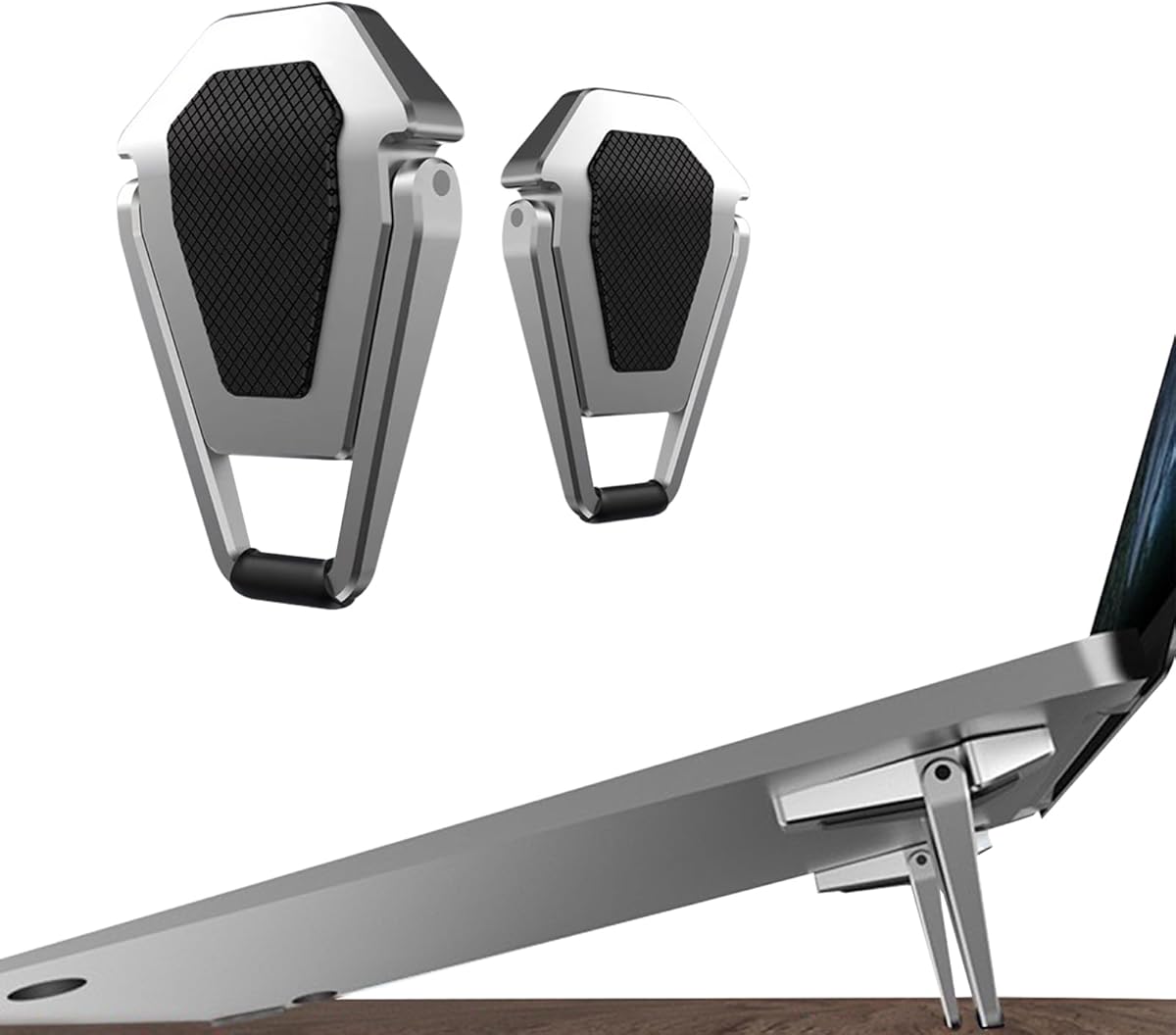



This dual-pack laptop kickstand offers a budget-friendly solution for cooling and ergonomic improvement. With a solid 4.6 rating, users appreciate the durability and effective heat dissipation it provides for daily tasks.
We may earn a commission when you buy through this link, at no additional cost to you.
Made from aluminum alloy, these stands are built to last while keeping your device running cool. The design ensures a comfortable viewing angle that helps maintain good posture during extended work sessions.
While the angle is fixed, the stability and material quality make up for the lack of adjustability. Some users might prefer variable heights, but the consistent performance is reliable for most standard laptop models.
Ideal for anyone needing two stands for multiple devices or backup, this set is a practical choice. The universal fit covers most brands, ensuring you can use them across different setups without hassle.
The aluminum material actively helps dissipate heat, preventing overheating during long gaming or work sessions.
Elevating the laptop reduces neck strain by bringing the screen to a more natural eye level.
We may earn a commission when you buy through this link, at no additional cost to you.
This invisible laptop kickstand stands out for its incredibly light weight and compact profile. Weighing only 24 grams, it is perfect for travelers who need ergonomic benefits without adding bulk to their bag.
We may earn a commission when you buy through this link, at no additional cost to you.
Crafted from high-quality zinc alloy, it combines durability with impressive load-bearing capacity. The adjustable tilt angle ranging from 15 to 25 degrees allows for some customization to suit your viewing preferences.
The compact design folds down to a mere 1.9 by 1.4 inches, making it a true space-saver. However, the adhesive mounting may not suit those who prefer frequently moving stands between different surfaces or devices.
Best suited for on-the-go professionals and students, this option offers reliable support for a wide range of laptops. Its efficient heat dissipation and secure grip ensure your device stays safe and cool.
Weighing just 24 grams, this stand adds zero weight to your load while providing essential ergonomic support.
Adjustable tilt angles from 15 to 25 degrees let you find the perfect typing and viewing height.
We may earn a commission when you buy through this link, at no additional cost to you.
The Hagibis laptop kickstand earns top marks for its versatile three-height adjustment option. It allows you to switch freely between 10mm, 20mm, and 36mm heights, providing significant flexibility for different typing scenarios.
We may earn a commission when you buy through this link, at no additional cost to you.
Constructed from aluminum alloy, it acts as a thermal pad to help cool your laptop effectively. The forward-tilt angle and open design enhance airflow, which is crucial for preventing overheating during heavy use.
Stability is a key feature here, with an increased bottom sticking surface to prevent the stand from falling off. This design choice addresses common issues with portable risers that might shift during active typing.
With compatibility covering 12 to 17 inch devices, this stand fits most popular models including MacBook Pro and Dell XPS. It is an excellent choice for users needing reliable cooling and ergonomic lift without bulk.
Three selectable heights let you customize the screen position for optimal eye level and typing comfort.
Open design increases air circulation at the bottom to speed up heat dissipation and protect components.
We may earn a commission when you buy through this link, at no additional cost to you.
This dual-pack laptop kickstand offers instant switching between 8 degrees casual browsing and 13 degrees ergonomic typing. The unique triangular support design provides stability without requiring tools for adjustments.
We may earn a commission when you buy through this link, at no additional cost to you.
Included with the purchase is a free webcam cover, adding a layer of digital security to your workspace setup. This bonus feature highlights a focus on both physical posture and privacy protection for users.
Made of high-quality ABS plastic, it withstands daily wear and even high temperatures like 200 degrees Fahrenheit. The anti-slip silicone ensures your device stays secure on the stand without slipping or getting scratched.
For users who value quick adjustments and privacy features, this is a smart purchase. While the material is less premium than metal options, the functionality and included accessories make it a compelling choice.
Instantly switch between viewing and typing modes without tools to maintain productivity on the go.
A free webcam cover protects your digital security, adding value beyond just physical support.
We may earn a commission when you buy through this link, at no additional cost to you.
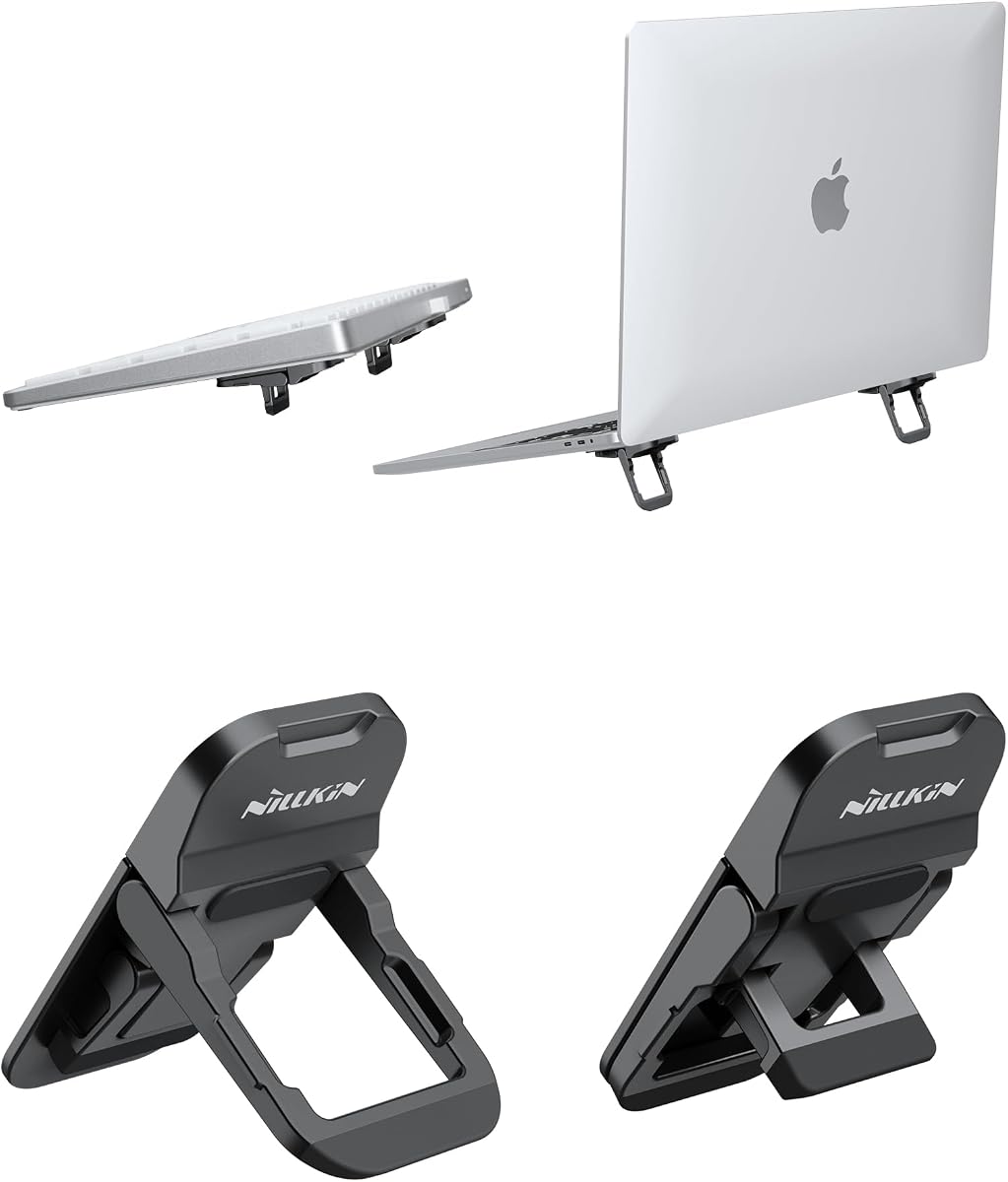
The Nillkin laptop kickstand provides three precise angles at 3, 11, and 16 degrees to reduce strain effectively. This level of control helps optimize comfort for different tasks like long writing sessions or casual browsing.
We may earn a commission when you buy through this link, at no additional cost to you.
Crafted from premium zinc alloy, it balances sturdiness with light weight. The triangular support design ensures your device remains stable while typing, which is crucial for maintaining focus during work or study.
Adhesion is handled via nano traceless adhesive that ensures firm attachment without leaving residue. However, it is recommended to let it sit for an hour for full adsorption to maximize stability on your device.
If you need a stand that can also work with external keyboards, this model is compatible with a wide range of devices. Its foldable design makes it an ideal choice for travel and classroom use.
Three distinct angles allow fine-tuned ergonomic adjustment to fit your specific neck and shoulder comfort needs.
Nano traceless adhesive secures the stand firmly without leaving sticky residue when removed later.
We may earn a commission when you buy through this link, at no additional cost to you.
Getting two stands for one low price makes this penitue option a strong budget winner. The zinc alloy construction ensures reliability, allowing you to support both your laptop and keyboard with ease.
We may earn a commission when you buy through this link, at no additional cost to you.
Measuring about 4.2 by 3 cm, these stands are compact enough to store in pockets or bags easily. Their foldable design means they can be stowed away when not in use, saving valuable space in your workspace.
The ergonomic design improves posture and reduces neck pressure, which is vital for long work sessions. They also improve air circulation around your device to prevent overheating during intensive tasks or gaming.
Ideal for households with multiple devices, this dual set lets you set up ergonomic positions in different rooms. Whether for home, office, or outdoor work, these versatile stands bring much convenience to daily life.
A 2-pack lets you equip multiple workspaces with ergonomic support without buying two separate units.
Zinc alloy ensures durability and resistance to break or deform over time compared to plastic options.
We may earn a commission when you buy through this link, at no additional cost to you.
This versatile laptop kickstand functions as a tablet easel, phone holder, and selfie stick, consolidating three accessories into one. Its N52 magnetic core instantly snaps onto iPhone models and MagSafe cases for quick setup.
We may earn a commission when you buy through this link, at no additional cost to you.
Built from premium aerospace aluminum, it holds heavy 15.6 to 17 inch gaming laptops without wobbling. The custom-tensioned hinges guarantee zero sagging under load, providing a rock-solid typing experience during intensive use.
With eight distinct height adjustment slots, you can elevate your screen up to 5.5 inches to match your natural line of sight. This flexibility helps correct sitting posture to relieve neck strain effectively.
Collapsing into a flat baton in just 3 seconds, it is perfect for travelers who need robust support. If you want a single device that handles phones and laptops, this is a powerful choice.
Integrated N52 magnets snap onto iPhones and MagSafe cases for a quick dual-screen productivity hub.
Aerospace aluminum construction supports heavy gaming laptops without sagging, ensuring safety and stability.
We may earn a commission when you buy through this link, at no additional cost to you.
The Ringke laptop kickstand is a premium option designed for those who value quality and sleek design. With the highest rating of 4.7, it is a trusted choice for travelers needing reliable, lightweight support.
We may earn a commission when you buy through this link, at no additional cost to you.
Made of high-quality zinc alloy and non-slip TPU, it is slim yet strong. The non-slip TPU helps maintain stability and prevents your device from sliding on the surface during use.
It offers three levels of height for comfortable typing and viewing. Enhancing airflow for efficient heat dissipation, it helps keep your device running smoothly even during heavy tasks.
Easy to install via adhesives, this stand adds no tools or screws to your routine. If you are looking for a premium feel and reliable performance, this model is a top recommendation.
High-quality zinc alloy ensures a strong, durable build that maintains its look and function over time.
The stand enhances airflow to dissipate heat, keeping your device cooler during extended use.
We may earn a commission when you buy through this link, at no additional cost to you.
This laptop kickstand features a built-in spring mechanism that allows it to pop up instantly in 0.1 seconds. The design ensures it can be opened and closed without looking, making it convenient for busy workflows.
We may earn a commission when you buy through this link, at no additional cost to you.
Constructed from solid zinc alloy, it balances function and appearance. It securely holds your laptop in place without wobbling, while its sleek design protects both your desk surface and hands from scratches.
The high-quality adhesive keeps the stand firmly attached to the back of your laptop. This ensures stability even when you move your device or use it in different locations throughout the day.
Perfect for travel and meetings, it folds down to the size of an index finger. If you want quick access to ergonomic positioning without fiddling with adjustments, this is a smart tool.
Pop-up design opens the stand in 0.1 seconds, saving time and effort for daily use.
Supports a wide range from 8 to 20 inches, making it versatile for laptops, tablets, and more.
We may earn a commission when you buy through this link, at no additional cost to you.
This ringke laptop kickstand is designed for quick installation and instant use without added weight or bulk. The 3M adhesives allow for smooth adhesion, ensuring the stand stays in place securely.
We may earn a commission when you buy through this link, at no additional cost to you.
It is compatible with any device larger than 9 inches, offering broad utility for tablets and laptops. Soft slide prevention pads prevent damages on the surface, protecting your device during long usage periods.
The lightweight design ensures it does not weigh down your laptop, keeping it portable. However, repeated removal may lower adhesive performance, so it is best to apply it once for long-term use.
Ideal for those who prioritize minimalism and simplicity, this stand provides reliable support. Its simple design focuses on functionality without adding extra steps or tools to your workspace routine.
Adds zero weight to your setup, maintaining the sleek look and feel of your device.
3M adhesives provide reliable bonding for consistent stability during typing and viewing.
We may earn a commission when you buy through this link, at no additional cost to you.
Choosing the right laptop kickstand depends on your specific needs for mobility, stability, and cooling. This guide helps you evaluate key factors to make an informed decision.
Materials like aluminum and zinc alloy offer better heat dissipation and durability than plastic. High-quality metals also add a premium feel and can support heavier devices securely without bending.
Look for stands made from durable materials that match your device's aesthetics and weight class for long-lasting performance.
Adjustability allows you to find the perfect ergonomic position for your neck and wrists. Options with multiple angles or sliding mechanisms offer more flexibility than fixed-height stands.
Choose adjustable stands if you need to switch between different tasks or share your workspace with others.
For travelers, lightweight and foldable designs are essential to save space in bags. Some stands are designed to be invisible or ultra-thin, reducing added bulk significantly.
Prioritize compact, lightweight options if you frequently move between locations or commute regularly.
Ensure the stand supports your device's size and weight. Many stands advertise compatibility from 10 to 20 inches to cover most laptops and tablets.
Check the manufacturer's listed size range to guarantee a secure fit for your specific model.
Stability features like anti-slip pads or reinforced bases prevent your device from sliding. A stable stand is critical for typing comfort and preventing accidental drops.
Look for silicone pads or widened bases that keep your laptop steady on all surfaces.
If the stand is adhesive-based, quality is key to avoid damaging your laptop. High-quality adhesives like 3M provide strong hold while allowing residue-free removal.
Ensure the adhesive is designed for smooth surfaces and does not leave residue when removed.
A good stand should enhance airflow to keep your laptop cool. Open designs or raised profiles help heat dissipate more effectively than flat surfaces.
Prioritize designs that maximize ventilation to prevent overheating during heavy workloads.
Compare features like privacy shields or multi-device compatibility against the price. Some bundles include extra accessories like webcam covers that add value to the core functionality.
Look for packages that offer extra benefits without costing too much for your budget.
First, clean the bottom of your laptop to ensure a smooth surface for adhesive stands. This prevents dust from interfering with the bond and ensures the stand stays secure.
Once attached, adjust the stand to your preferred viewing angle to maximize ergonomic benefits. Test stability by typing gently to ensure it does not shift during use.
For maintenance, avoid using harsh chemicals that might damage the stand's finish or adhesive. If using a foldable stand, ensure it is fully closed before stowing it in your bag.
Many laptop kickstands are compatible with tablets and phones if they fall within the weight and size range. Look for universal designs that mention support for smaller devices to ensure versatility.
High-quality adhesive stands use non-residue adhesives that are safe for most smooth laptop surfaces. Always check the adhesive type and clean the surface before applying to prevent damage.
Most stands support up to 10 kilograms, which is sufficient for 15 to 17 inch laptops. Always verify the load capacity in the product specifications before purchasing for heavy devices.
Many models offer multiple height settings or adjustable angles. Look for stands with sliding mechanisms or multiple notches if you need variable positioning for different tasks.
Yes, by raising the laptop, a kickstand improves airflow around the vents. This helps heat dissipate more efficiently, especially during intensive tasks like gaming or video rendering.
High-quality stands made from zinc alloy or aluminum are designed to withstand daily use. Check the materials and user reviews to confirm the build quality meets your daily needs.
Selecting the right laptop kickstand can significantly improve your daily workflow comfort and device longevity. Our top picks offer a variety of options from budget-friendly sets to premium ergonomic solutions.
Consider your specific needs for portability, adjustability, and cooling capacity to find the best match. Whether you value lightweight design or sturdy cooling, there is a stand suited for your setup.
Remember to check current prices and availability before making your final decision. The options listed provide a reliable starting point for enhancing your workspace ergonomics and productivity.