
BENGOO Gaming Mouse Wired with RGB Backlit
4.6Editor score
Adjustable DPI Switch
Six Flexible Buttons
Multi-color Lighting
Discover the top light up led mouse models for gaming and office use. This guide compares features, performance, and design to help you choose the best option.
Finding the right light up led mouse can transform your workspace into a vibrant gaming setup or a sleek office environment. These devices combine functionality with aesthetic appeal, offering customizable lighting that matches your personal style and mood.
We evaluated ten top-rated models based on connectivity, durability, and user feedback. Our comparison covers wired and wireless options, ensuring you find a reliable companion for your computer setup that delivers precision and comfort during long sessions.
Each selection highlights unique strengths like ergonomic design, adjustable DPI, and silent clicking technology. Please note that product availability and pricing may fluctuate over time, so checking current listings is recommended before making your final purchase decision.
4.6Editor score

4.3Editor score

4.5Editor score
This side-by-side comparison outlines the key specifications of every model featured in our guide to help you make an informed decision based on your specific needs.




The BENGOO Gaming Mouse stands out as a top contender for budget-conscious gamers seeking style and function. With a high user rating of 4.6 stars, this wired mouse delivers solid performance without requiring complex drivers or software installation.
We may earn a commission when you buy through this link, at no additional cost to you.
Its customizable RGB backlighting allows you to adjust the atmosphere of your gaming setup instantly. The ergonomic design ensures your hand stays comfortable during extended sessions, while the adjustable DPI switch lets you toggle speeds between 1200 and 3600 easily.
While the cable may feel slightly stiff compared to premium braided options, the overall build quality remains robust for everyday use. This mouse prioritizes essential features over unnecessary bloat, making it a reliable choice for casual and competitive play alike.
This model is ideal for anyone needing a dependable LED mouse for general computing or gaming. If you want vibrant lighting and a comfortable shape without spending much, this BENGOO option delivers exceptional value for money.
The multi-color lights provide a fancy gaming environment that highlights your game atmosphere effectively.
Four adjustable DPI levels give you precise control over cursor speed and responsiveness.
We may earn a commission when you buy through this link, at no additional cost to you.
This rechargeable wireless gaming mouse offers a perfect balance of convenience and performance for daily use. It earns the Editor's Choice badge due to its silent click technology and stable 2.4G wireless connection that minimizes input lag.
We may earn a commission when you buy through this link, at no additional cost to you.
The flowing rainbow backlight mode creates a stunning visual effect while providing necessary illumination for dark workspaces. With up to 20 days of battery life with lights on, you can work or game for weeks without needing a recharge.
The silent buttons make this mouse suitable for libraries or offices where noise is a concern. However, those who prefer Bluetooth connectivity might find the lack of dual mode a limitation compared to other modern wireless devices on the market.
Choose this mouse if you need a quiet, reliable peripheral for productivity and casual gaming. Its ergonomic design and rechargeable battery ensure long-term comfort and reduce waste from disposable batteries.
Noiseless clicks ensure you do not disturb others in quiet environments like offices or libraries.
Advanced power saving allows for weeks of usage on a single charge depending on lighting use.
We may earn a commission when you buy through this link, at no additional cost to you.
This wired gaming mouse distinguishes itself with a durable metal chassis and unique laser carving technology that enhances both look and feel. It earns the Best Premium label due to its superior build quality and extended warranty support.
We may earn a commission when you buy through this link, at no additional cost to you.
The 7-color breathing light adds a sophisticated glow to your setup without being overly flashy. Combined with 4 adjustable DPI levels up to 3200, it offers the precision needed for competitive gaming and professional tasks requiring high accuracy.
The metal flanking and chassis provide robust protection against drops and shocks, making it a long-lasting investment. While the higher price reflects these premium features, the comfort and durability justify the cost for users who want a reliable tool.
This mouse is perfect for serious gamers or professionals who prioritize build quality and longevity. The skin-friendly material ensures you stay comfortable during long work sessions without fatigue or irritation.
Metal chassis and shockproof design ensure the mouse survives daily wear and accidental drops.
Soft 7-color lighting creates a calming and professional atmosphere on your desk.
We may earn a commission when you buy through this link, at no additional cost to you.
The HOTLIFE Wireless Mouse Slim offers versatile connectivity with both Bluetooth and 2.4G wireless options. This makes it an excellent choice for users with devices that lack traditional USB ports or prefer a cleaner cable-free setup.
We may earn a commission when you buy through this link, at no additional cost to you.
Its slim profile and lightweight design make it easy to toss into a laptop bag for travel. The inclusion of a back to desktop button adds productivity value, allowing quick navigation while browsing the web or working on complex projects.
While the maximum DPI is lower than gaming-focused options, it suits office work and general browsing well. The silent click and rechargeable battery ensure a quiet and eco-friendly experience for users on the go.
Select this mouse if you need a portable companion for a laptop or tablet. The dual connection methods and productivity buttons make it a practical tool for modern mobile workspaces.
Switch between Bluetooth and USB receiver to fit any device configuration seamlessly.
Slim and lightweight design allows for easy transport in backpacks and laptop bags.
We may earn a commission when you buy through this link, at no additional cost to you.
This wired mouse delivers high performance with a 3200 DPI optical tracking system that ensures precision on various surfaces. The unique design combining circular and breathing LED light highlights the atmosphere of gaming without being distracting.
We may earn a commission when you buy through this link, at no additional cost to you.
Its ergonomic shape provides a comfortable hand feel for long sessions, making it suitable for both office work and gaming. The six buttons offer additional functionality for shortcuts and navigation, enhancing productivity across different applications.
The plug-and-play nature means no driver installation is required, saving setup time for users. However, the cable is not detachable, which limits cable management options compared to other modern peripherals in this category.
This option is best for users seeking straightforward performance and reliability. The wide compatibility ensures it works seamlessly with Windows, Mac, and Linux systems out of the box.
Optical tracking technology provides accurate cursor movement across different desk surfaces.
The shape fits naturally in the hand to reduce fatigue during extended use.
We may earn a commission when you buy through this link, at no additional cost to you.
The VersionTECH Wireless Gaming Mouse features a unique lightning crackle design with 7-color breathing LED lights. It supports stable 2.4G wireless transmission and silent clicking for a smooth user experience during work and play.
We may earn a commission when you buy through this link, at no additional cost to you.
With a built-in rechargeable battery, this mouse eliminates the need for disposable batteries and reduces waste. The auto sleep mode helps conserve power when the device is idle, extending usage time between charges effectively.
While the light mode speeds up battery consumption, you can turn it off to save energy. The silent buttons ensure you remain focused without worrying about bothering others in shared environments.
This model is suitable for gamers and professionals needing a wireless option with visual flair. Just ensure you have the right adapters if your device relies solely on USB-C ports.
Unique crackle design with breathing lights adds a cool aesthetic to your setup.
Automatic sleep mode extends battery life when the mouse is not in active use.
We may earn a commission when you buy through this link, at no additional cost to you.
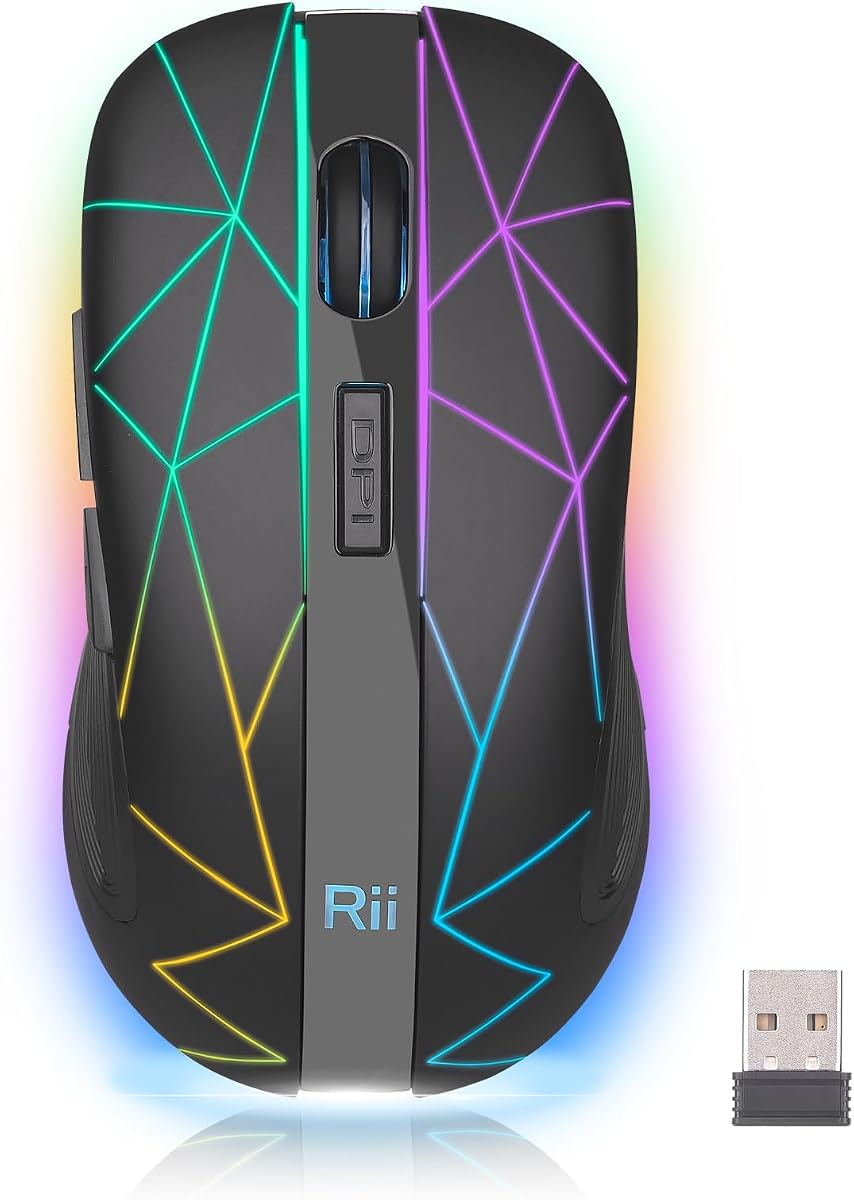
The Rii Wireless Mouse is designed with portability in mind, featuring a compact size that fits easily into laptop bags. It combines ergonomic comfort with colorful RGB LED changes to keep the workspace lively.
We may earn a commission when you buy through this link, at no additional cost to you.
Its rechargeable battery supports long usage periods and enters intelligent sleep mode to save power when not in use. The 3-level DPI adjustment allows you to control speed for both precise tasks and rapid navigation.
While it offers basic features compared to high-end models, it covers all the essentials for travel and office work. The contoured shape ensures a natural curve fit for the hand, reducing strain over time.
This mouse is ideal for travelers who need a reliable wireless backup. Its simple setup and broad compatibility make it a hassle-free option for multiple devices.
Compact dimensions make it easy to carry in any laptop bag or backpack.
Random color changes create a cool atmosphere for work and play environments.
We may earn a commission when you buy through this link, at no additional cost to you.
The TENMOS M2 focuses on quiet operation with super silent click buttons that prevent distractions. Its cool and soft LED light changes randomly to offer soothing ambient lighting for your desk area.
We may earn a commission when you buy through this link, at no additional cost to you.
Advanced 2.4G wireless technology ensures stable transmission up to 10 meters. The rechargeable battery allows you to use the mouse while it charges, ensuring no downtime during critical tasks.
Ergonomic design and smooth skin-friendly materials provide maximum comfort for long-term use. The ability to turn off the light switch gives users flexibility depending on their lighting preferences.
This model is perfect for quiet offices or dorms where noise is a significant concern. The reliable tracking and battery life make it a dependable tool for daily productivity.
Super silent clicks prevent noise disruptions in shared or quiet environments.
Soft LED colors provide a relaxing atmosphere while you work or game.
We may earn a commission when you buy through this link, at no additional cost to you.
The TENMOS V7 offers a super comfortable wireless experience with colorful breathing light that changes randomly. It features a power-saving mode that puts the device to sleep after 10 minutes of no operation.
We may earn a commission when you buy through this link, at no additional cost to you.
Advanced 2.4G wireless technology supports a working distance of up to 10 meters for stable transmission. The silent click feature keeps noise to a minimum, making it suitable for quiet study or work sessions.
You can turn the light off via a switch if you prefer a distraction-free environment. The rechargeable design removes the need for frequent battery changes, offering convenience and environmental benefits.
This mouse is an excellent choice for general use requiring reliability and comfort. Its widespread compatibility ensures it works well with most operating systems including Windows and Mac.
Ergonomic shape and wireless freedom allow for relaxed use during long sessions.
Colorful breathing light adds a stylish touch to your workspace setup.
We may earn a commission when you buy through this link, at no additional cost to you.
The Guiheng Dual Mode Bluetooth Wireless Crack Gaming Mouse supports both Bluetooth and 2.4G wireless for versatile connection options. It features a unique lightning crackle design with 7-color breathing LED light for a striking look.
We may earn a commission when you buy through this link, at no additional cost to you.
Silent buttons ensure no disturbance while using in shared spaces. The rechargeable battery includes smart power-saving technology to extend usage time and reduce battery changes.
Ergonomic shape and smooth skin-friendly materials ensure maximum comfort during long periods of use. This device is widely compatible with Windows and Mac systems, making it a flexible choice for various setups.
Choose this mouse if you need dual connectivity and aesthetic appeal. Its versatile nature allows seamless transitions between desktops and mobile devices without needing multiple peripherals.
Switch between Bluetooth and wireless modes to match your device requirements.
Unique lightning design with changing lights creates a dynamic visual experience.
We may earn a commission when you buy through this link, at no additional cost to you.
Selecting the right light up led mouse involves evaluating several key factors to ensure it meets your specific needs.
Decide whether you prefer wired, wireless, or dual-mode options. Wired mice offer stability and no battery anxiety, while wireless models reduce cable clutter. Dual-mode mice provide flexibility to switch between Bluetooth and USB receivers.
Choose based on your primary device setup and port availability.
Look for adjustable DPI settings to control cursor speed and precision. Higher DPI values are useful for gaming and high-resolution screens, while lower DPI offers control for design work.
Ensure the mouse supports on-the-fly switching for convenience during tasks.
Check the lighting options such as breathing modes, rainbow effects, or static colors. Some users prefer customizable RGB lighting to match their setup theme, while others want simple illumination.
Consider if the lights can be turned off to save battery on wireless models.
An ergonomic shape reduces hand strain during extended use. Look for contoured designs that fit your palm and skin-friendly materials for comfort.
Select a size that matches your hand dimensions to prevent fatigue.
For wireless mice, check battery life and charging options. Rechargeable batteries are eco-friendly and cost-effective compared to disposable ones.
Opt for models with long battery life and power-saving features if you use the mouse frequently.
Silent click technology is vital for shared spaces like offices and libraries. Noiseless buttons prevent disturbances while maintaining responsive performance.
Prioritize silent clicks if you often work in quiet environments.
Ensure the mouse works with your operating system, whether Windows, Mac, or Linux. Some models have specific drivers or require adapters for USB-C ports.
Verify broad compatibility to avoid connectivity issues across devices.
Durable materials like metal chassis protect against drops and wear. A robust build ensures longevity and reliable performance over time.
Choose models with warranties to protect your investment.
To set up your new mouse, connect the USB receiver via a Bluetooth connection depending on your model. Follow the simple plug-and-play instructions to get started without installing extra drivers.
Customize the lighting by pressing the designated LED button to cycle through colors. Adjust DPI settings by clicking the DPI button to find your preferred speed for gaming or office tasks.
Keep your mouse clean by wiping it with a dry cloth to avoid dust buildup on the sensors. For wireless models, charge the battery regularly to maintain optimal performance and battery life.
Yes, light up led mice often feature adjustable DPI and ergonomic designs that enhance gaming performance. The lighting adds aesthetic value without sacrificing functionality.
Most of these models are plug and play and do not need extra software. However, some users may prefer installing drivers for advanced customization options.
Battery life varies by model but often ranges from several days to weeks on a single charge. Turning off the LED lights can significantly extend this duration.
Many models in this guide are compatible with Mac OS systems. Always verify system requirements before purchase to ensure full functionality.
Silent mice are designed to produce minimal sound during clicks. This makes them ideal for quiet environments where noise could be disruptive.
Usually, a dedicated button on the mouse cycles through available colors or modes. Pressing the button repeatedly allows you to select your preferred look.
We hope this guide helped you find the perfect light up led mouse for your setup. Each model offers unique features tailored to different budgets and preferences.
Prioritize factors like connectivity, ergonomics, and lighting to match your specific workflow. A good mouse enhances both productivity and comfort during your daily tasks.
Remember to check current prices and availability before making a final decision. Prices change frequently, so staying updated ensures you get the best value available.