
BOSGAME E4 Air
4.2Editor score
Affordable price point
Triple 4K display support
Quiet cooling operation
Discover the top Linux Mini Pcs for 2026. Our guide compares performance, storage, and OS support to help you find the ideal compact computer.
Linux Mini Pcs offer a compact and efficient solution for users seeking open-source flexibility without the bulk of traditional desktops. These devices are perfect for developers, hobbyists, and professionals who value privacy and customization in their computing environment.
We evaluated ten distinct models based on processor power, memory scalability, storage options, and native Linux support. Our comparison ensures you understand the trade-offs between budget-friendly options and high-performance machines tailored for specific workloads.
Each pick highlights unique strengths such as pre-installed distributions, expandability, or thermal efficiency. Please note that prices fluctuate frequently due to market demand, so verify current costs before making your final purchase decision.
4.2Editor score

4.8Editor score

4.7Editor score
This side-by-side comparison outlines the core specifications of each selected Linux Mini PC. We focus on processor type, memory capacity, storage options, and display capabilities to help you quickly identify the best fit.


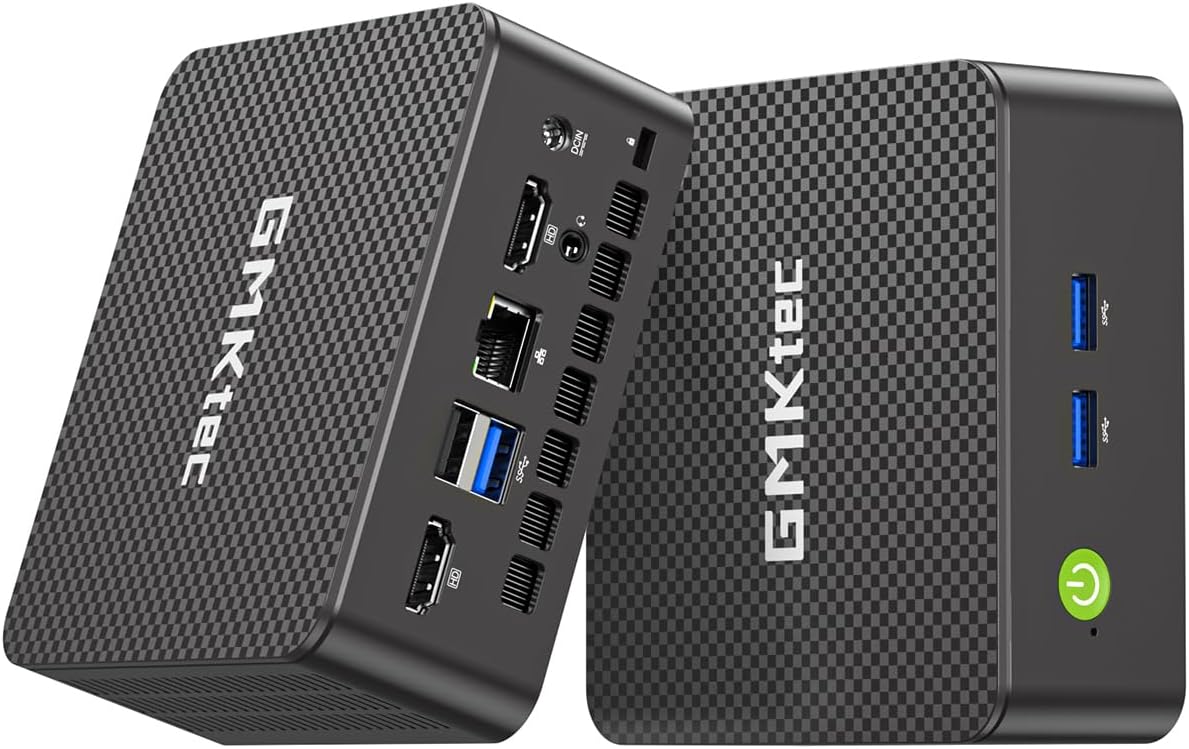
The TK Node Mini PC stands out as the premier choice for Linux enthusiasts needing reliability and support. Pre-loaded with Zorin OS Core, it offers a seamless transition from Windows while maintaining Linux efficiency.
We may earn a commission when you buy through this link, at no additional cost to you.
Its hardware flexibility is remarkable. You can expand RAM up to 64GB and add up to 4TB via dual NVMe slots. This makes it ideal for virtualization, home servers, or heavy development tasks.
While base RAM is modest, the upgrade path is clear. The system is designed for 24/7 operation, ensuring it handles continuous workloads without throttling. The US-based warranty adds significant peace of mind.
Buy this if you value a pre-configured open-source environment backed by solid hardware warranties. It is a versatile, long-term investment for anyone serious about Linux computing.
Zorin OS provides a familiar interface, reducing the learning curve for new Linux users immediately.
Dual SO-DIMM and NVMe slots ensure your system stays relevant as your storage and memory needs increase.
We may earn a commission when you buy through this link, at no additional cost to you.
The Beelink SER3 delivers reliable performance for general productivity tasks at an affordable price point. Its 16GB RAM configuration is generous for this tier, allowing smooth multitasking across applications.
We may earn a commission when you buy through this link, at no additional cost to you.
Designed with two HDMI ports, it supports dual 4K displays efficiently. The Radeon Vega 3 graphics handle video playback and light graphical work without issue, making it suitable for media centers.
However, the CPU architecture is older, which may limit heavy compilation or AI workloads. If you need basic office tasks, browsing, and media streaming, this machine excels in cost-efficiency.
Choose this model for straightforward computing needs where budget is the primary constraint. It remains a solid entry-level Linux mini PC for home offices.
Starting with 16GB RAM ensures you don't face bottlenecks when running multiple browser tabs simultaneously.
Two HDMI ports allow you to connect two monitors effortlessly for enhanced workflow efficiency.
We may earn a commission when you buy through this link, at no additional cost to you.
The ASUS NUC 14 Pro represents the pinnacle of mini PC power. It ships with Linux Mint and features the latest Intel Ultra 7 processor, offering exceptional performance for complex software development tasks.
We may earn a commission when you buy through this link, at no additional cost to you.
With 64GB DDR5 RAM and a 2TB PCIe Gen4 SSD, storage and memory bottlenecks are virtually eliminated. The Intel Arc GPU provides strong graphics capabilities, supporting up to four 4K displays easily.
This machine is built for professionals who need desktop-level power in a compact form. Thunderbolt 4 connectivity ensures fast data transfer speeds and versatile peripheral support for high-end setups.
Invest in this if you require top-tier speed and expandability without compromising on OS support. It is the best premium option for demanding Linux workloads.
The Intel Ultra 7 processor ensures rapid compilation and smooth AI training workflows.
Thunderbolt 4 allows for daisy-chaining high-speed storage and ultra-fast networking.
We may earn a commission when you buy through this link, at no additional cost to you.
The Beelink Mini S12 Pro focuses on energy efficiency without sacrificing usability. Powered by the N100 chip, it consumes minimal power, making it perfect for a 24/7 NAS or server setup.
We may earn a commission when you buy through this link, at no additional cost to you.
It supports dual 4K displays at 60Hz, which is impressive for such a low-power device. The cooling system is refined to keep noise levels low during continuous operation in home offices.
While it lacks the raw power for heavy virtualization, it handles everyday tasks and media playback flawlessly. The dual HDMI ports add significant versatility for multi-monitor workspaces.
Choose this for silent, efficient computing where heat and power draw matter most. It is a practical choice for lightweight Linux environments.
The advanced cooling system ensures the fan remains barely audible even under sustained loads.
Low TDP design significantly reduces electricity costs over long-term continuous use.
We may earn a commission when you buy through this link, at no additional cost to you.
The KAMRUI Pinova P2 delivers impressive graphics performance in a tiny chassis. Its ability to drive three 4K screens makes it ideal for traders or developers needing vast screen real estate.
We may earn a commission when you buy through this link, at no additional cost to you.
The Ryzen 7 3300U provides solid multitasking power. The system includes two M.2 slots for expansion, allowing you to add storage as needed without replacing the primary drive.
While the RAM is soldered, 16GB is sufficient for most users. The compact design allows for easy transport, making it a great candidate for mobile Linux setups.
Opt for this if multi-monitor productivity is your top priority. It offers a unique blend of portability and high-resolution output.
Triple display support maximizes workflow efficiency by allowing multiple applications to run side by side.
Dual M.2 slots let you configure storage capacity to match your specific file volume needs.
We may earn a commission when you buy through this link, at no additional cost to you.
The GMKtec G11 is engineered specifically for network enthusiasts. Its dual 2.5GbE ports make it perfect for running pfSense or OPNsense firewall appliances on Linux with ease.
We may earn a commission when you buy through this link, at no additional cost to you.
The AMD R2514 processor delivers better performance than many competing low-power chips. It supports triple 4K displays, ensuring it can also double as a general media center if needed.
Network users will appreciate the bandwidth capacity, while casual users benefit from the stable connectivity. This balance makes it a standout for home labs.
Select this model if you need a dedicated network controller or server. It excels in connectivity where other mini PCs fall short.
Dual 2.5GbE ports allow for high-speed routing and firewall applications without bottlenecks.
The embedded AMD CPU ensures stability for long-running network monitoring tasks.
We may earn a commission when you buy through this link, at no additional cost to you.
The CyberGeek Mini PC brings desktop-class CPU power to a compact Linux chassis. Its i9-11900H processor is designed for heavy computational loads, making it suitable for Linux-based gaming or rendering.
We may earn a commission when you buy through this link, at no additional cost to you.
With 32GB RAM and a 1TB SSD, it handles demanding multitasking and large datasets effectively. Ubuntu pre-installed ensures you start working immediately without OS installation headaches.
However, relying on integrated graphics means it cannot run the latest AAA games at high settings. For emulated games and indie titles, it performs admirably on a small footprint.
Choose this if you need raw CPU performance for development or light gaming. It is a powerhouse for users who prioritize compute over graphics.
The i9 processor handles compilation and virtualization tasks with minimal latency.
Ubuntu Linux comes pre-configured to save time and ensure system compatibility.
We may earn a commission when you buy through this link, at no additional cost to you.
The BOSGAME E5 combines solid daily performance with advanced networking features. Its dual 2.5G LAN ports allow for high-speed NAS or router deployment on any compatible Linux distro.
We may earn a commission when you buy through this link, at no additional cost to you.
With a 512GB NVMe SSD, boot times and application launches are snappy. The Type-C port supports power delivery, simplifying cabling for mobile setups or thin client configurations.
It handles triple 4K displays well for productivity. While not a gaming powerhouse, it serves as an excellent workstation for general users needing reliable connectivity.
Opt for this if you need a versatile workstation with strong networking capabilities. It balances performance and portability effectively.
Type-C with Power Delivery allows for flexible power options and data transfer.
Dual LAN ports support complex network routing and firewall setups easily.
We may earn a commission when you buy through this link, at no additional cost to you.
The BOSGAME E4 Air offers an incredibly small footprint without sacrificing display capabilities. It supports three 4K screens, which is rare for such a compact and budget-friendly unit.
We may earn a commission when you buy through this link, at no additional cost to you.
Powered by the Ryzen 5 3500U, it handles daily office tasks and media consumption smoothly. Its lightweight design makes it easy to carry or mount behind monitors using VESA.
Storage and RAM are fixed at 256GB and 8GB, which may limit heavy users. However, for basic web browsing and media, it is an excellent value proposition.
Choose this for tight spaces where multiple screens are still required. It is a smart pick for minimalist setups.
Its compact size allows for discreet placement behind monitors or in tight desk spaces.
Triple 4K support maximizes visual workspace on a tiny physical device.
We may earn a commission when you buy through this link, at no additional cost to you.
The GMKtec G3S is an excellent entry point for Linux users on a strict budget. It features the N95 processor, which offers decent performance for basic web and media tasks.
We may earn a commission when you buy through this link, at no additional cost to you.
It supports dual 4K displays, allowing for a multi-monitor setup that is rare at this price point. AV1 decoding ensures smooth playback of modern video content.
While 8GB RAM limits multitasking, it is sufficient for single-task workloads. The compact design and low cost make it ideal for kiosks or digital signage.
Select this if you need a functional and inexpensive Linux box. It is a reliable choice for light computing needs.
This model provides essential features at a price point accessible to most users.
AV1 decoding ensures future-proof streaming performance for high-definition video content.
We may earn a commission when you buy through this link, at no additional cost to you.
Selecting the right Linux Mini PC requires evaluating several technical factors to ensure the device meets your specific operational needs.
The CPU is the heart of your system. For heavy workloads like AI training or virtualization, look for recent Intel Core Ultra or Ryzen processors. For basic office tasks, entry-level N-series chips suffice.
Always match the processor to your expected workload to avoid bottlenecks or unnecessary costs.
RAM determines how many applications can run simultaneously. Aim for at least 16GB for modern web browsing and development. Check if the device has open slots for future upgrades.
Prioritize models with user-accessible RAM slots to extend the lifespan of your hardware.
NVMe SSDs offer significantly faster boot times than SATA drives. Ensure the storage capacity meets your file needs, ideally 512GB or more. Look for dual M.2 slots for easy expansion.
Choose models with fast NVMe storage to ensure your system runs smoothly under load.
Some mini PCs come with Windows and require you to install Linux manually. Others, like Zorin or Linux Mint pre-installed, save you time and hardware compatibility issues.
Select a device that explicitly supports your preferred Linux distribution for a seamless setup experience.
Consider how many screens you need. Models with triple HDMI or DP ports allow for expanded workspace. USB-C ports with Power Delivery are valuable for reducing cable clutter.
Verify port availability matches your peripherals to avoid buying extra dongles or adapters.
Mini PCs run hot due to compact enclosures. Check for advanced cooling systems like copper heat sinks or silent fans. Thermal throttling can degrade performance during long tasks.
Prioritize units with proven cooling mechanisms if you need quiet operation in a home office.
For home servers, dual Ethernet ports are essential for routing or NAS configurations. Ensure the card supports Gigabit speeds or higher for fast data transfers.
Advanced networking features can transform a mini PC into a dedicated home lab appliance.
Hardware issues can happen. A US-based warranty with responsive support simplifies repairs. Check the duration of coverage and what it includes before purchasing.
Ensure the manufacturer offers reliable support to protect your investment over time.
Start by placing the device in a well-ventilated area. Proper airflow prevents overheating, especially during long tasks like compiling code or rendering.
Connect your peripherals and monitors securely. Use high-quality HDMI or DisplayPort cables to ensure stable 4K signals without interference.
Regularly update your OS and drivers using your distribution package manager. This keeps your system secure and ensures optimal hardware performance.
Many models like TK Node and ASUS NUC come with distributions like Zorin OS or Linux Mint. Others may ship with Windows, requiring you to install your preferred distro manually.
It depends on the model. Some devices like TK Node and BOSGAME E5 allow easy upgrades via SO-DIMM slots. Others have soldered RAM, so check specifications before buying.
Yes, if they have sufficient RAM and multi-core CPUs. Devices with 16GB or more RAM and modern processors handle virtual machines efficiently.
With proper care, they can last 5 to 7 years. Thermal management and component quality significantly impact longevity.
Absolutely. Models with dual Ethernet ports and low power draw are perfect for running servers, firewalls, or NAS software 24/7.
Most work well, but hardware-specific features like Wi-Fi chips can vary. Choosing established brands with Linux certification ensures better compatibility.
The TK Node Mini PC offers the best balance of OS support and hardware flexibility. For premium power, the ASUS NUC 14 Pro stands out with its advanced specs.
When choosing, prioritize your specific needs such as RAM expandability or network ports. Ensure the device aligns with your intended workload for best results.
Remember that prices change frequently. Always check current listings to get the most accurate pricing before finalizing your purchase.