
Redragon K618 PRO Wireless
4.1Editor score
Tri-mode connectivity options
Macro recording without software
Slim low profile design
This guide compares the top 10 low profile mechanical keyboards for speed and comfort, reviewing build quality, switches, and connectivity to find the perfect
Low profile mechanical keyboards offer a unique blend of speed, comfort, and sleek design that traditional full-height boards often lack. They are ideal for users who want mechanical feel without the bulk.
We evaluated ten leading models based on switch quality, connectivity options, build durability, and customization features. Our analysis covers everything from budget-friendly options to premium productivity tools.
Each pick highlights specific strengths like wireless versatility, gaming performance, or typing comfort. Please note that product availability and pricing may change frequently on retailer sites.
4.1Editor score

4.7Editor score

4.3Editor score
The following table provides a quick side-by-side overview of all ten keyboards reviewed in this guide to help you compare key specifications at a glance.


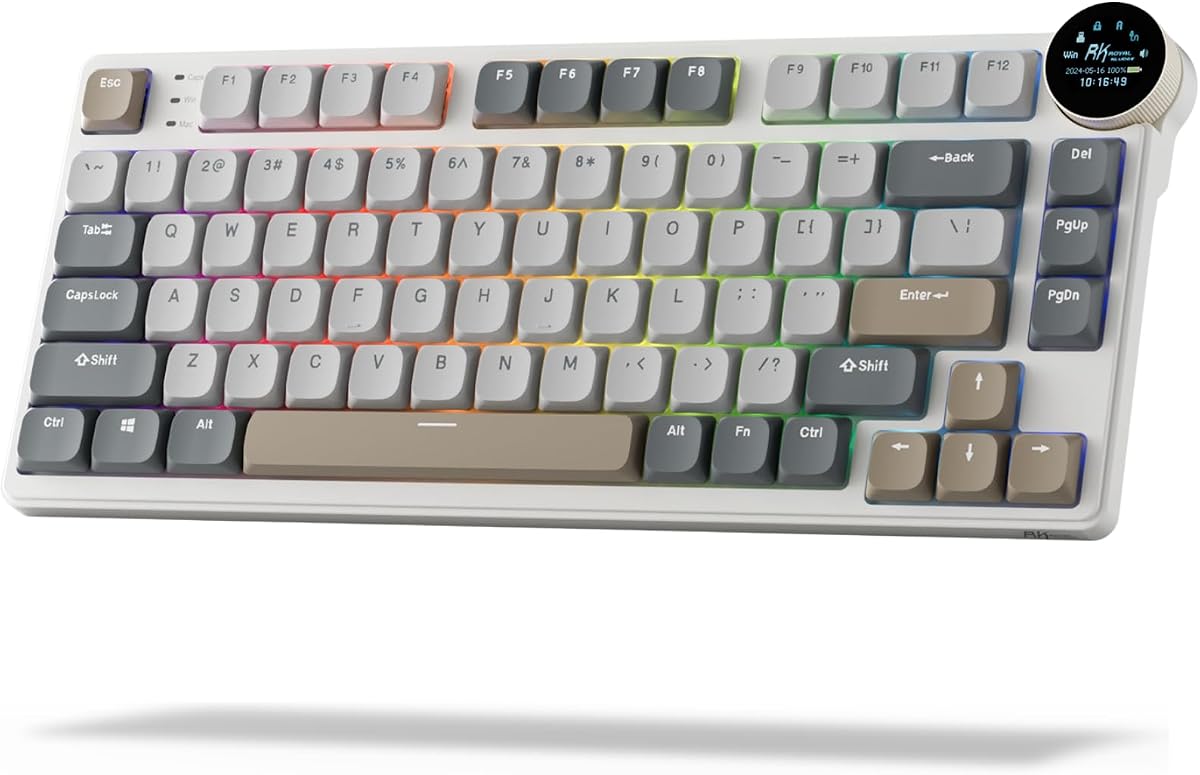


The Redragon K618 PRO offers a compelling entry point into low profile mechanical keyboards without breaking the bank. With a 4.1 star rating from users, it highlights practical features like macro recording and multi-device connectivity.
We may earn a commission when you buy through this link, at no additional cost to you.
Its tri-mode connectivity allows seamless switching between USB-C, Bluetooth, and 2.4GHz wireless modes. The dedicated macro zone is software-free which saves time for users who need quick custom shortcuts.
While the build feels lighter compared to premium aluminum models the reduced travel distance improves typing speed significantly. The linear Red switches provide smooth feedback ideal for both work and casual gaming.
If you need a reliable compact keyboard for tight budgets this model delivers essential features effectively. It is a strong choice for students or office workers needing basic customization.
The 30% slimmer profile shortens actuation distance allowing for faster keystrokes during rapid typing sessions.
Switching between PC laptop and tablet requires no re-pairing which keeps your workflow uninterrupted.
We may earn a commission when you buy through this link, at no additional cost to you.
The Keychron K3 Version 2 is a standout for users prioritizing desk space without losing functionality. Its 75% layout retains essential keys while maintaining a slim profile that pairs well with modern monitor setups.
We may earn a commission when you buy through this link, at no additional cost to you.
Equipped with Broadcom Bluetooth 5.1 it connects to three devices simultaneously. The open-source QMK firmware allows deep customization through the Keychron Launcher web app for personalized shortcuts.
Mac users will appreciate the dedicated layout keys that match Apple standards while remaining compatible with Windows systems. The reinforced aluminum body adds durability despite its lightweight design.
This keyboard is ideal for professionals who switch between Mac and Windows devices frequently. Its balance of portability and advanced customization makes it a versatile daily driver.
Open-source firmware allows endless key mapping possibilities including AI-assisted setup for complex macros.
The floating keycap design and thin profile reduce wrist strain during extended typing sessions.
We may earn a commission when you buy through this link, at no additional cost to you.
The Cherry MX 10.0N is designed for those who demand speed and premium build quality in a compact form. Its ultra-thin profile of 0.87 inches creates a modern aesthetic suitable for minimalist desk setups.
We may earn a commission when you buy through this link, at no additional cost to you.
Powered by Cherry MX Low Profile Speed switches it offers a linear and quiet experience that registers keystrokes quickly. This makes it highly responsive for gaming scenarios where split-second timing matters.
The aluminum housing provides a sturdy feel that resists flex during heavy use. An integrated stand bar allows for ergonomic adjustments to optimize typing posture and comfort.
If you prefer wired reliability and top-tier switch quality this model is an excellent investment. It caters to users who value premium materials and rapid actuation.
Linear Speed switches reduce actuation time allowing for faster repetitive inputs.
Solid aluminum construction ensures long-term durability and a consistent typing feel.
We may earn a commission when you buy through this link, at no additional cost to you.
The RK ROYAL KLUDGE N80 distinguishes itself with a dynamic smart display that adds functionality beyond standard inputs. It shows custom GIFs connection modes and battery status right on the keyboard.
We may earn a commission when you buy through this link, at no additional cost to you.
Tri-mode connectivity supports Bluetooth 5.0, 2.4GHz wireless, and USB-C wired modes. A convenient rotary knob simplifies volume control and brightness adjustments without needing software.
Its top-mounted design offers a firm keystroke with increased feedback stability. Sound-absorbing layers reduce hollow noises for a smoother acoustic experience.
This keyboard is perfect for users who want a unique visual touch and practical controls. It balances innovation with solid performance for daily tasks.
Smart display allows quick visual feedback on connection status and customization settings.
Triple sound-absorbing layers dampen noise while the heavy duty base prevents wobbling.
We may earn a commission when you buy through this link, at no additional cost to you.
The Flow Lite 84 Keys offers a premium typing experience with a focus on comfort and material quality. Its Specter linear switches operate at a lower force of 40gf to reduce finger fatigue.
We may earn a commission when you buy through this link, at no additional cost to you.
Gasket mount design ensures a soft cushioned feel that isolates keystrokes. PBT double shot keycaps provide a durable textured surface that resists shine over time.
Connectivity is flexible with 2.4GHz, Bluetooth, and wired options. The 1000Hz polling rate delivers fast response times suitable for demanding applications.
Ideal for professionals seeking a refined tactile feel this keyboard supports long-term comfort. Its thoughtful design elevates the daily typing experience significantly.
Lower operating force reduces muscle strain making it suitable for long typing sessions.
Gasket mount and dampening layers improve acoustic quality and tactile feedback.
We may earn a commission when you buy through this link, at no additional cost to you.
The Keychron K1 Ultra 8K stands out with an impressive 8K wired polling rate that ensures minimal latency. Its 80% TKL layout balances space saving with necessary function keys.
We may earn a commission when you buy through this link, at no additional cost to you.
Hot-swappable sockets allow easy customization of low-profile POM switches without soldering. ZMK firmware and an AI-assisted Launcher app simplify advanced configuration for users.
North-facing RGB backlighting provides 22 effects. Sound-dampening layers reduce noise while hardwood side panels add a premium aesthetic touch.
For enthusiasts demanding top-tier performance and customization this is a leading choice. It bridges the gap between mechanical precision and modern connectivity.
8K polling ensures ultra-responsive inputs while hot-swap allows switch experimentation easily.
Hardwood panels and sound dampening create a polished look and pleasant acoustic profile.
We may earn a commission when you buy through this link, at no additional cost to you.
The Keychron K17 Max maximizes desktop space efficiency with a 96% layout that retains the numeric keypad. It is powered by QMK open-source firmware for transparency and security.
We may earn a commission when you buy through this link, at no additional cost to you.
Gateron low-profile switches provide a 31% thinner profile than standard models. The aluminum frame maintains structural integrity while keeping the keyboard incredibly slim.
Double-shot PBT keycaps resist shine and ensure long-term use. Bluetooth connectivity supports up to three devices for seamless multi-system workflows.
This model is perfect for professionals who need a full-size feature set in a compact form. It supports high-speed gaming and daily productivity equally well.
96% design keeps essential number keys for data entry without requiring a full numpad.
Open-source QMK ensures flexibility and aluminum construction provides premium durability.
We may earn a commission when you buy through this link, at no additional cost to you.
The Flow Lite 100 Keys provides a full-size layout without compromising on low-profile ergonomics. Its 3000mAh battery supports up to 100 hours of use with lights off.
We may earn a commission when you buy through this link, at no additional cost to you.
Specter linear switches operate at 40gf to minimize joint fatigue. Gasket mount design offers a soft cushioned typing experience with rich acoustic tones.
Connectivity includes 2.4GHz, Bluetooth, and wired modes. The 1000Hz polling rate ensures responsiveness suitable for gaming as well as typing.
If you need all standard keys for data entry or spreadsheets this model offers comfort and convenience. It is a robust choice for heavy daily users.
High capacity battery ensures long uninterrupted sessions between charges on the go.
Gasket mount and low force reduce strain during extended work hours at the desk.
We may earn a commission when you buy through this link, at no additional cost to you.
The Keychron K3 Max SE combines 75% compactness with powerful wireless performance. It supports 2.4 GHz for gaming and Bluetooth 5.2 for switching up to three devices.
We may earn a commission when you buy through this link, at no additional cost to you.
QMK firmware and Launcher app allow deep customization. Hot-swappable support lets you change switches easily to suit personal preferences.
EPDM acoustic foam creates a quieter typing experience. Redesigned stabilizers reduce wobble on larger keys like Spacebar and Enter.
This is an ideal choice for wireless enthusiasts who value customization and sound quality. It delivers reliable performance without the clutter of cables.
Dual wireless modes ensure both low latency gaming and seamless device switching.
Acoustic foam and new stabilizers improve typing quality and reduce distracting noise.
We may earn a commission when you buy through this link, at no additional cost to you.
The Razer Ornata V3 merges the feel of a membrane keyboard with mechanical-like feedback. Its mecha-membrane switches deliver snappy clicks with reduced effort.
We may earn a commission when you buy through this link, at no additional cost to you.
A magnetic soft touch wrist rest provides extra comfort during long sessions. UV-coated keycaps ensure durability and resistance to fading.
Dedicated media keys simplify volume and playback adjustments. The slim profile allows for a natural hand position reducing fatigue.
This model suits users seeking a hybrid experience that prioritizes comfort. It is an accessible option for those transitioning to low-profile designs.
Wrist rest and low keys reduce strain making extended use comfortable.
UV coating and mecha-membrane switches ensure long life and easy media control.
We may earn a commission when you buy through this link, at no additional cost to you.
Selecting the right low profile mechanical keyboard involves considering several factors to match your specific needs and workspace.
Low profile switches come in linear tactile or clicky varieties. Linear switches offer smooth travel ideal for gaming while tactile ones provide feedback for typing.
Choose linear for speed or tactile for feedback depending on your primary use case.
Wireless models offer flexibility with Bluetooth or 2.4GHz modes. Wired connections ensure zero latency which is critical for competitive gaming.
Prioritize tri-mode connectivity if you switch between multiple devices often.
Layouts range from compact 75% to full 100% or 96%. Smaller sizes save desk space while larger ones include a numeric keypad.
Assess your desk space and need for number keys before deciding.
Materials like aluminum provide durability and a premium feel. ABS plastic frames are lighter but may feel less rigid.
Aluminum is preferred for longevity while plastic suits portability.
Features like hot-swap sockets allow switch replacement without soldering. QMK firmware enables deep key mapping and macro customization.
Look for open-source firmware support if you want advanced control.
Lower front heights reduce wrist strain compared to standard boards. Look for built-in kickstands for angle adjustments.
Ergonomic profiles are vital for comfort during long work sessions.
Wireless keyboards vary in battery capacity. Higher mAh values mean longer usage between charges especially with RGB lights off.
Check battery ratings if you plan to use it away from a power source.
Foam layers or acoustic coatings reduce hollow noise during typing. Quieter boards are better for shared office spaces.
Prioritize models with sound-absorbing features if noise is a concern.
Clean your keyboard regularly by turning it upside down to shake out debris and using a soft brush to remove dust from switches.
Store the keyboard in a dry place away from direct sunlight to prevent keycap fading and electronic damage.
Update firmware periodically through manufacturer tools to ensure stability and access new features like customization.
They are often faster due to shorter travel distance allowing quicker actuation. However, latency depends more on connectivity type like 2.4GHz or wired. Choose models with high polling rates.
Most manufacturers guarantee similar lifespans around 50 million keystrokes. The reduced travel distance can actually reduce wear on internal components over time.
Yes many models like Keychron support Mac layouts and multimedia keys. Check for included keycaps or firmware options that enable seamless Mac compatibility.
Mechanical switches cost more to manufacture and require more complex circuitry. Premium materials like aluminum add to the production cost.
Top choices include Keychron, Redragon, RK Royal Kludge, and Lofree. These brands offer reliable builds and modern connectivity features.
Some models feature hot-swap sockets that allow changing switches easily. Others are soldered so check for hot-swap support before buying.
These ten keyboards offer a range of choices from budget friendly to premium productivity tools with different layouts and connectivity options.
Focus on your primary needs such as comfort, speed, or device flexibility when selecting the right model for your setup.
Prices and availability fluctuate so check current deals on the provided links to secure the best option for your requirements.