
SteelSeries Apex 3 Gaming Keyboard – Black
4.6Editor score
IP32 Water Resistant Design
Whisper Quiet Gaming Switches
10 Zone RGB Illumination
Discover the top Mac gaming keyboards compared for performance and compatibility. This guide reviews wireless and wired options optimized for macOS and gaming
Finding the right Mac gaming keyboard requires balancing seamless macOS integration with high-performance gaming features. Users need keyboards that respect system shortcuts while delivering fast response times and durability for intense sessions.
We evaluated ten top models based on switch quality, connectivity options, layout efficiency, and software support. Our comparison prioritizes devices that offer native Mac keycaps, reliable wireless or wired modes, and robust build quality.
Each selection highlights unique strengths like budget value, premium materials, or advanced customization. While we highlight key features and specs, always check current availability and pricing on retailer sites as they can vary over time.
4.6Editor score
4.3Editor score

4.0Editor score
This side by side comparison evaluates ten leading mechanical and membrane keyboards designed for Mac users. We assess layout compatibility, switch types, connectivity stability, and additional features like multimedia controls and RGB lighting to help you find the perfect match.


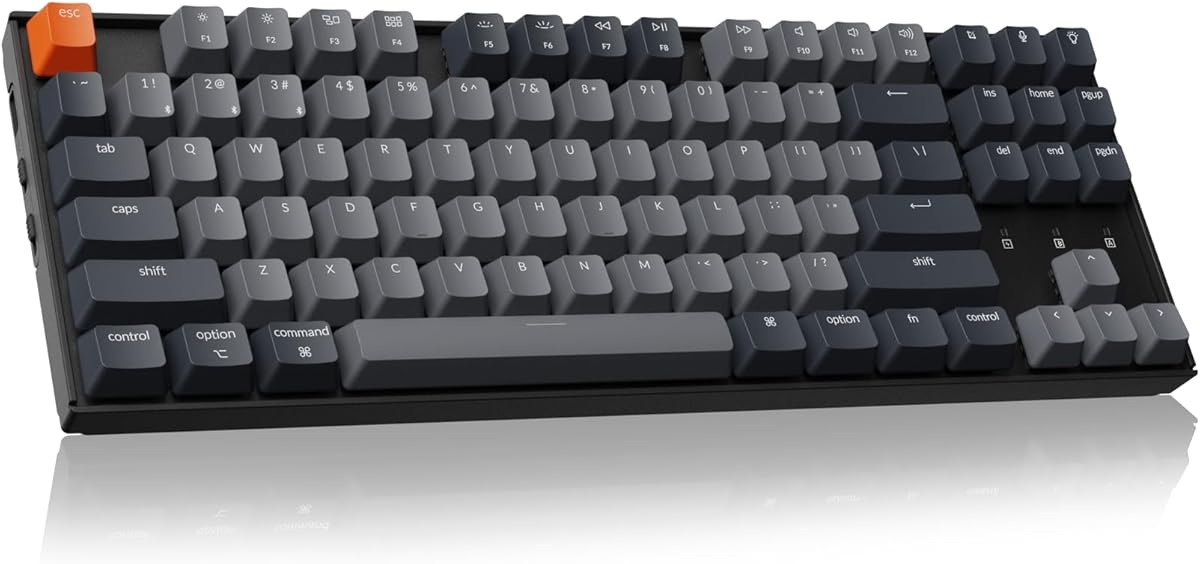
The Keychron K8 stands out as the top choice for Mac gamers needing reliable wireless performance and precise tactile feedback. With a 4.3 star rating from thousands of users, it consistently delivers on its promise of versatility and comfort for long sessions.
We may earn a commission when you buy through this link, at no additional cost to you.
Its dual connection modes allow you to pair with up to three devices via Bluetooth 5.1 and switch instantly. The tactile brown switches offer a satisfying bump without excessive noise, making it ideal for both gaming and daily productivity on macOS.
While it lacks the flashy RGB features of some rivals, the white backlight provides clear visibility. The only minor trade off is the absence of a volume knob, but the dedicated function keys handle media controls efficiently.
This keyboard is perfect for Mac users who want a full mechanical experience without cluttering their desk. It balances professional aesthetics with gaming readiness, ensuring smooth operation whether you are coding or competing online.
Includes extra keycaps for both Mac and Windows systems to ensure seamless layout switching across operating systems.
Equipped with a massive 4000 mAh battery that supports up to 200 hours of use without backlighting.
We may earn a commission when you buy through this link, at no additional cost to you.
The SteelSeries Apex 3 offers an entry level gaming experience that fits various budgets without sacrificing core features. Rated 4.6 stars, it is a favorite for students and casual gamers who need a durable and visually appealing keyboard.
We may earn a commission when you buy through this link, at no additional cost to you.
Its IP32 water resistant coating protects against accidental spills, which is crucial for desk setups near drinks. The whisper quiet switches ensure you can game late at night without disturbing others, while the 10 zone RGB adds style.
The lack of mechanical switches means it lacks the precision of higher end models, but it still handles anti ghosting well. The included magnetic wrist rest adds comfort for extended play sessions, making this a complete package.
Choose this keyboard if you prioritize durability and cost efficiency over mechanical feel. It works reliably with Mac systems and provides a clean look that enhances any gaming setup immediately.
Designed with IP32 water resistance to prevent damage from accidental liquid spills during intense gaming sessions.
Features 10 zone RGB illumination that allows for gorgeous color schemes and reactive effects to match your style.
We may earn a commission when you buy through this link, at no additional cost to you.
The Logitech G915 X Wired delivers top tier performance for serious gamers who want speed and precision. With a 4.0 rating, it is praised for its innovative low profile switches and robust build quality that withstands rigorous daily use.
We may earn a commission when you buy through this link, at no additional cost to you.
Its low profile GL mechanical switches provide a 1.3 mm actuation point for incredibly fast response times. This reduces fatigue during long sessions while maintaining the tactile feedback essential for competitive gaming on Mac.
The sandblasted aluminum top plate ensures a sleek look and solid feel, though the price reflects this premium status. While it lacks wireless flexibility in this specific wired variant, the performance benefits often outweigh that limitation.
Invest in this keyboard if you demand the best in engineering and durability. It transforms your desktop into a command center with intuitive controls and unmatched typing precision for both work and play.
Achieve higher actions per minute with low-profile GL switches featuring a 1.3 mm actuation point and short travel distance.
Set up to 15 functions per key using KEYCONTROL to turn your keyboard into a personalized command center.
We may earn a commission when you buy through this link, at no additional cost to you.
The EPOMAKER X Aula F75 MAX brings innovation with its built TFT screen and programmable knob for enhanced control. Rated 4.6 stars, it appeals to enthusiasts who value unique aesthetics and a rich, thocky typing sound.
We may earn a commission when you buy through this link, at no additional cost to you.
Its gasket mount structure and silicone foams create a soft, ergonomic typing experience that reduces finger fatigue. The hot swappable design lets you experiment with different switches easily, making it a flexible choice for personalizing your setup.
The compact 75% layout saves desk space while keeping essential navigation keys. While the software offers deep customization, it might require some time to master compared to simpler interfaces found on standard keyboards.
Pick this keyboard if you love tweaking every detail of your typing experience. The vibrant RGB lighting and functional display make it a standout piece that boosts productivity and fun alike.
Separates the PCB from the shell to reduce harsh bottoming out and provide a softer, more flexible typing feel.
Supports Bluetooth, 2.4Ghz wireless, and cable mode to ensure stable connections for gaming and office tasks.
We may earn a commission when you buy through this link, at no additional cost to you.
The Logitech G413 TKL SE combines solid mechanical performance with a professional look at an accessible price point. With a 4.6 rating, it is trusted for its durability and consistent performance in both gaming and productivity environments.
We may earn a commission when you buy through this link, at no additional cost to you.
Its PBT keycaps resist wear and shine better than standard ABS plastic, ensuring long term clarity. The brushed aluminum top case adds rigidity to prevent flex during intense typing, enhancing stability for fast paced actions.
The tactile switches provide clear feedback without being too loud, fitting well in shared spaces. While the white LED backlighting is simple, it ensures good visibility in dim rooms without distracting color shifts.
This model is ideal for those seeking a no nonsense mechanical keyboard that lasts. It strips away unnecessary bloat to focus on core gaming features that deliver reliable results every day.
Built with a brushed aluminum-magnesium alloy top case that serves as a robust backbone to minimize flex.
Features 6 key rollover anti ghosting to ensure accurate inputs during complex key combinations.
We may earn a commission when you buy through this link, at no additional cost to you.
The Redragon K742 stands out for its support of advanced customization tools like QMK and VIA, rare at this price point. Rated 4.6 stars, it offers a premium feature set that allows deep key remapping and macro editing.
We may earn a commission when you buy through this link, at no additional cost to you.
Its tri mode connectivity lets you switch seamlessly between Bluetooth and wireless modes while keeping a wired option for reliability. The 98% layout saves space while retaining essential keys, making it perfect for minimalist setups.
The gasket structure provides a bouncy, comfortable feel that is softer than rigid boards. However, configuring the software might require some effort to fully unlock its potential compared to more streamlined applications.
Choose this keyboard if you love customizing your input experience deeply. The combination of modern features and ergonomic design makes it a versatile tool for both coding and gaming.
Upgraded with QMK and VIA support for endless possibilities in remapping keys and customizing layers.
Allows tri mode connectivity with Bluetooth 5.0 and 2.4Ghz wireless for effortless connection of up to three devices.
We may earn a commission when you buy through this link, at no additional cost to you.
The Keychron K4 offers a compact 96% layout that retains the number pad without sacrificing too much desk space. With a 4.4 rating, it is highly rated for productivity users who also game and need quick access to numeric data.
We may earn a commission when you buy through this link, at no additional cost to you.
Its Bluetooth 5.1 chipset ensures stable connections across up to three devices, making it great for multi device workflows. The keychron super switches are built to last 50 million clicks, ensuring reliability even with heavy daily use.
While the white backlight is functional, it lacks the vibrant colors of RGB models. The battery life is impressive, supporting hundreds of hours on a single charge, reducing the need for frequent recharging.
This keyboard is a smart choice for professionals balancing work and play. Its Mac optimized layout and durable build make it a versatile partner for any demanding task on your desktop.
Features a 96% layout with 100 keys including a number pad in a compact design for productivity and typing.
Built with a broad compatibility Broadcom Bluetooth 5.1 chipset for high reliability and smooth device switching.
We may earn a commission when you buy through this link, at no additional cost to you.
The Logitech MX Mechanical is designed for users who want a premium typing experience that transitions smoothly from office to game. Rated 4.2 stars, it is celebrated for its smart backlighting and comfortable low profile mechanical keys.
We may earn a commission when you buy through this link, at no additional cost to you.
Its smart illumination sensors detect your hands to light up keys automatically, adjusting to your environment. The tactile quiet switches provide a satisfying bump without being disruptive, making it suitable for shared workspaces or quiet gaming.
Flow support allows you to move your cursor between computers seamlessly, boosting productivity workflows. While not a dedicated gaming beast, its responsiveness is sufficient for casual gaming and creative tasks on Mac.
Choose this keyboard if you value elegance and multi device efficiency. It blends professional utility with quality build, offering a refined experience that fits modern digital environments perfectly.
Backlit keys light up the moment your hands approach and automatically adjust to suit changing lighting conditions.
Customize Fn keys and enable Flow cross computer control to streamline your workflow across multiple systems.
We may earn a commission when you buy through this link, at no additional cost to you.
The GravaStar Mercury K1 captivates with its futuristic aluminum alloy design that looks as strong as it performs. Rated 4.7 stars, it is a favorite for those who want their keyboard to be a centerpiece of their setup.
We may earn a commission when you buy through this link, at no additional cost to you.
Its gasket mounted structure and sound dampening foam create a satisfying, quiet typing sound. The tri mode connectivity ensures you can connect via Bluetooth, 2.4GHz, or USB-C to handle various devices with ease.
The custom linear switches offer a smooth feel that minimizes accidental presses. While the keyboard is heavy, this adds to its stability and premium feel, making it a reliable companion for intense sessions.
Select this keyboard if you want a blend of style and substance. Its unique curves and customizable lighting ensure it stands out while delivering high quality performance for any Mac user.
Features a unique aluminum alloy exoskeleton with a gradient finish combining strength and lightness in flowing curves.
Supports wired USB-C, Bluetooth 5.0, and 2.4GHz wireless for seamless switching between devices and setups.
We may earn a commission when you buy through this link, at no additional cost to you.
The Logitech G213 Prodigy focuses on comfort and durability for extended sessions. Rated 4.2 stars, it includes a built in palm rest and media controls that make managing multimedia tasks quick and easy.
We may earn a commission when you buy through this link, at no additional cost to you.
Its anti ghosting gaming matrix ensures accurate inputs during complex gameplay. The five customizable lighting zones offer enough personalization to match your setup without the bulk of full RGB systems.
The spill resistant design protects against crumbs and liquids, adding practical value for daily use. While it uses membrane switches, they are tuned to deliver responsive feedback that satisfies casual and entry level gamers.
This keyboard is perfect for those prioritizing comfort and practicality. Its ergonomic design and straightforward controls make it a reliable choice for gaming and productivity without needing a steep learning curve.
Stay comfortable during long gaming sessions thanks to an integrated palm rest and adjustable keyboard feet.
Features dedicated media controls that can play, pause, and mute music and videos instantly with the touch of a button.
We may earn a commission when you buy through this link, at no additional cost to you.
Choosing the right keyboard for Mac gaming involves evaluating compatibility, switch type, layout, and connectivity. This guide breaks down the key factors to ensure you select a model that fits your workflow and gaming style.
Ensure the keyboard supports macOS shortcuts and includes correct keycaps for Command and Option keys. Some models like Keychron offer dedicated layouts to prevent confusion and streamline your workflow.
Look for keyboards explicitly labeled as Mac compatible to avoid having to remap keys manually for basic functions.
Mechanical switches offer tactile feedback and durability, with linear options being quiet and smooth while tactile ones provide a bump. Membrane switches are quieter but less responsive for fast gaming.
Choose linear switches for rapid repeated inputs in shooters and tactile ones for typing and general gaming accuracy.
Full size keyboards include a numpad useful for productivity but take up more desk space. TKL or compact layouts save room while keeping essential keys for gaming and navigation.
Decide based on your desk space and whether you frequently use numeric input during your daily tasks.
Wired connections offer zero latency which is ideal for competitive gaming. Wireless options provide flexibility and cable management but require charging and checking for Bluetooth stability.
Consider tri mode keyboards if you need to switch between multiple devices seamlessly while maintaining reliable input speeds.
Keyboards with aluminum or magnesium alloy frames resist flex and feel more premium. PBT keycaps are durable and resist shine compared to standard ABS plastics.
Prioritize materials that match your longevity expectations to ensure the keyboard stays functional and stylish for years.
Dedicated media keys or volume knobs allow quick adjustments without leaving the game. Some models offer software customization for mapping these controls to specific functions.
Ensure the keyboard offers convenient access to volume and playback controls to enhance your overall entertainment experience.
Robust software allows you to remap keys, create macros, and adjust lighting zones. Some brands provide open source options like QMK for advanced users.
Check the software ecosystem to confirm it supports your workflow and offers the level of customization you need for efficiency.
Wrist rests and adjustable feet help maintain a neutral wrist position to prevent fatigue. Look for keyboards designed to be comfortable during long periods of use.
Invest in ergonomic features that support proper posture to reduce strain and improve your gaming endurance.
Begin by pairing your wireless keyboard via Bluetooth settings on your Mac and installing any necessary drivers or software updates. Ensure the battery is charged if using wireless modes to prevent interruptions during critical tasks.
Clean your keyboard regularly using compressed air to remove dust and debris between keys. Wipe the surface with a slightly damp cloth to maintain hygiene and prevent grime buildup that could affect key responsiveness.
Customize your key mappings using the provided software to create macros or remap keys for specific games. Adjust backlighting settings to reduce eye strain in low light environments and optimize your visual experience.
Most of the keyboards listed are designed with macOS compatibility in mind. They include keycaps for Mac specific keys and support system shortcuts to ensure seamless integration without manual remapping.
Many models support both wired and wireless modes. If you prefer the stability of a cable during gaming, you can always plug it in even if the keyboard also supports Bluetooth connectivity.
Mechanical keyboards offer faster response times and durability compared to membrane models. Their precise actuation points provide a more responsive gaming experience, which is beneficial for competitive titles.
Most keyboards include a physical switch or function key to toggle between operating systems. This changes the key mapping to match the active OS, ensuring correct shortcuts are used automatically.
Bluetooth 5.1 or newer provides low latency connections suitable for most gaming scenarios. For competitive play, a wired connection is recommended to eliminate any potential latency.
A wrist rest supports your palms to maintain a neutral wrist position during long typing sessions. This reduces strain and fatigue, helping you stay comfortable while gaming or working.
Yes, most models offer RGB customization through dedicated software. You can choose colors, effects, and zones to match your setup or specific game themes.
If you drink near your workspace, spill resistant features protect internal components from accidental liquid exposure. This extends the lifespan of the keyboard and reduces maintenance needs.
We explored ten top options ranging from budget friendly choices to premium mechanical models tailored for Mac users. Each keyboard offers distinct advantages depending on your needs for connectivity, customization, or ergonomics.
Prioritize layout compatibility and switch type to ensure the keyboard enhances your gaming performance. A model that matches your workflow and desk space will provide the most value over time.
Prices and availability can change frequently so verify current details before purchasing. Use the links provided to find the best deals and ensure you get the correct version for your Mac system.