
Acer Nitro V 16S AI
4.4Editor score
AMD Ryzen 7 260
32GB DDR5 Memory
180Hz WUXGA Display
Finding the right gaming laptop for Baldurs Gate 3 requires balancing power with portability. You need strong graphics and quick processors to handle its detailed world and complex mechanics without lagging during intense sessions.
We compared ten top models based on performance metrics, display quality, and thermal efficiency. This list covers a range of prices and configurations to help you find the machine that fits your gaming style and budget perfectly.
Each pick shows key specs and real-world strengths for running this specific title. Keep in mind that prices and availability can change quickly so check current listings before making your final decision on which laptop to choose.
4.4Editor score

4.4Editor score

4.8Editor score
As an Amazon Associate we earn from qualifying purchases.
Here is a side-by-side look at all ten laptops evaluated for performance and value to run Baldurs Gate 3 smoothly.



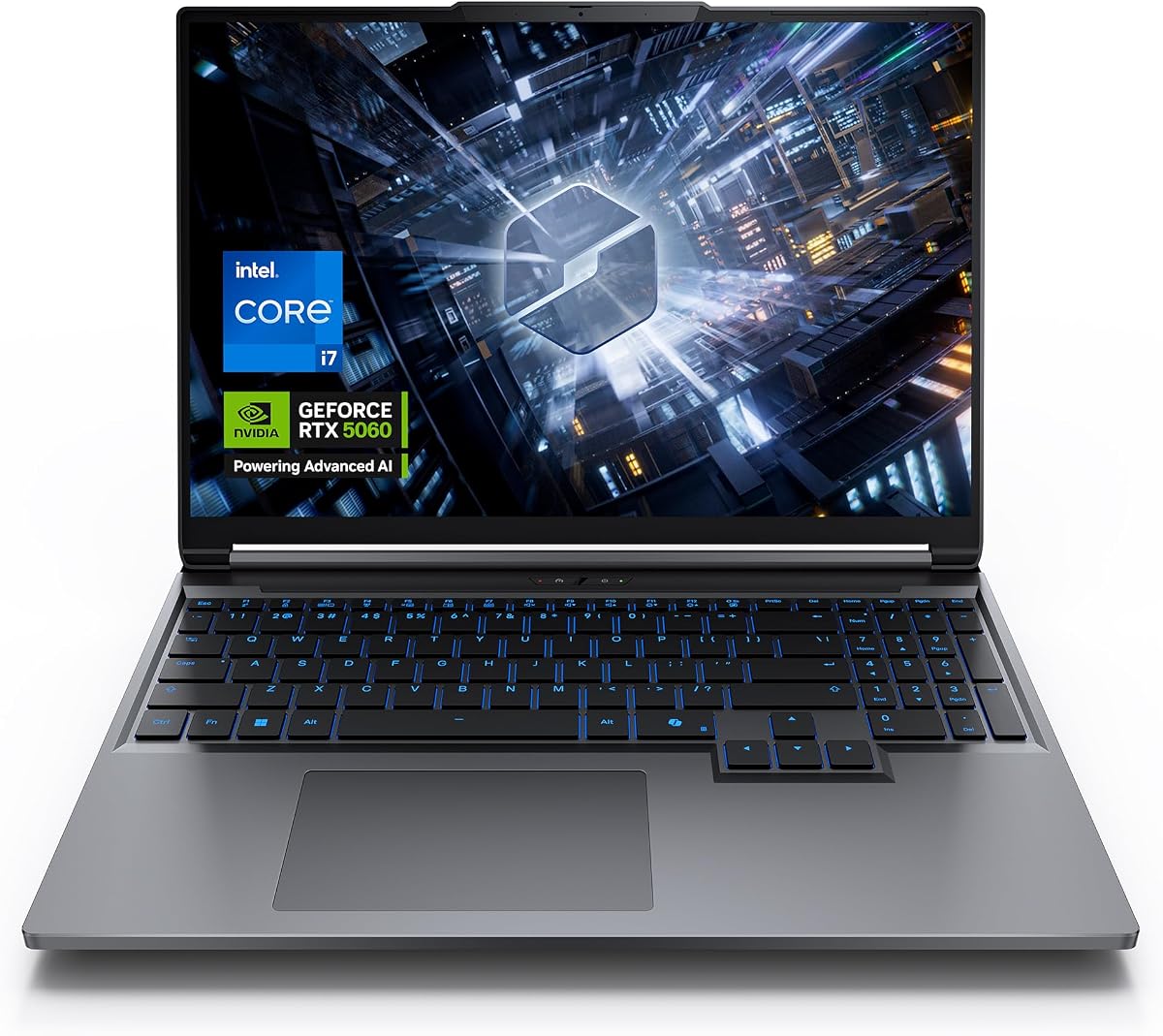


This ASUS ROG Strix G16 delivers strong gaming performance with its RTX 5060 GPU and Intel Core i7 processor making it ideal for Baldurs Gate 3. It rates well among gamers seeking reliable frame rates and smooth visuals during long sessions.
We may earn a commission when you buy through this link, at no additional cost to you.
The RTX 5060 GPU features NVIDIA Blackwell architecture and DLSS 4 for better frame rates while the 165Hz display ensures smooth motion. Advanced cooling keeps thermals low during intense gameplay so you stay comfortable while exploring the Forgotten Realms.
The system can get loud under full load and the battery lasts only a few hours for unplugged work. These trade-offs are acceptable for a dedicated gaming machine focused on performance rather than mobility.
Buy this laptop if you want top tier gaming power without paying flagship prices. It balances speed efficiency and value to handle Baldurs Gate 3 and future titles with confidence.
The RTX 5060 GPU delivers smooth high fidelity visuals in Baldurs Gate 3 with ray tracing supported for immersive lighting.
The 165Hz FHD+ screen offers crisp motion and accurate colors for both gameplay and media consumption.
We may earn a commission when you buy through this link, at no additional cost to you.
The Acer Nitro V 16S brings impressive performance at a budget price with its Ryzen 7 260 CPU and RTX 5060 GPU. It handles Baldurs Gate 3 smoothly and includes 32GB DDR5 RAM for multitasking.
We may earn a commission when you buy through this link, at no additional cost to you.
With DLSS 4 and ray tracing support the GPU delivers high fidelity visuals while the 180Hz display keeps motion fluid. The Ryzen 7 260 handles AI workloads efficiently for streaming and content creation alongside gaming.
Build quality is functional rather than premium and the chassis uses more plastic than aluminum. Wi-Fi 6 support is standard but lags behind newer Wi-Fi 7 systems in latency for competitive online gaming.
Choose this laptop if you want strong gaming power without overspending. It offers one of the best price to performance ratios for Baldurs Gate 3 and similar demanding titles.
Thirty two gigabytes of DDR5 RAM ensure seamless multitasking between games and creative apps without slowdowns.
The 180Hz refresh rate provides ultra smooth motion for fast paced combat and cinematic sequences in Baldurs Gate 3.
We may earn a commission when you buy through this link, at no additional cost to you.
The Dell Alienware 16 Aurora sets a premium standard with its high quality build and powerful RTX 5060 GPU for Baldurs Gate 3. It features a stunning WQXGA display and robust cooling for long sessions.
We may earn a commission when you buy through this link, at no additional cost to you.
The 2560×1600 display delivers sharp details and accurate colors which bring the game world to life. Advanced thermal management keeps the laptop quiet and cool even under heavy load for sustained high frame rates.
Its weight and size make it less portable than smaller models and the price is higher than many competitors. These factors are acceptable if you prioritize build quality and visual fidelity for your gaming setup.
Invest in this laptop if you want a premium machine with top tier visuals and durability. It is perfect for desktop replacement setups that run Baldurs Gate 3 at maximum settings.
The WQXGA screen provides high resolution visuals that reveal fine details in the game and environments.
Advanced cooling solutions keep thermals low during extended gaming sessions without excessive noise or heat.
We may earn a commission when you buy through this link, at no additional cost to you.
The msi Cyborg 17 offers a large 17.3 inch screen for immersive Baldurs Gate 3 gaming without adding too much weight. It balances screen real estate with portability for gamers who want a bigger view.
We may earn a commission when you buy through this link, at no additional cost to you.
The RTX 5060 GPU delivers solid frame rates while the Intel Core 7 CPU handles multitasking efficiently. Cooler Boost technology keeps thermals in check during long play sessions for consistent performance.
Audio quality is average and the display uses a standard panel with limited color range compared to premium models. These downsides are minor for users focused primarily on screen size and performance.
Buy this laptop if you want a larger display for gaming and streaming without a heavy machine. It works well for Baldurs Gate 3 and offers good portability for a seventeen inch laptop.
The 17.3 inch display offers a spacious view that enhances immersion in detailed game worlds like Baldurs Gate 3.
Despite the large screen this model remains thin and light enough to carry to different locations easily.
We may earn a commission when you buy through this link, at no additional cost to you.
The GIGABYTE Gaming A16 features the powerful RTX 5070 GPU which exceeds the needs of Baldurs Gate 3 for high settings. It delivers strong performance for gaming and creative workloads with DLSS 4 support.
We may earn a commission when you buy through this link, at no additional cost to you.
The RTX 5070 offers excellent ray tracing and AI acceleration for immersive visuals while the slim chassis fits well on desks. Windows 11 Home and GiMATE provide a smart interface for managing performance modes and tasks.
Thermals can climb under full load and the keyboard feedback feels average compared to gaming keyboards. These issues do not significantly affect gaming performance but may impact comfort during long typing sessions.
Choose this laptop if you want strong GPU power for future games and creative apps. It handles Baldurs Gate 3 easily and offers a slim premium feel at a competitive price point.
The RTX 5070 GPU delivers high frame rates and ray tracing for the most immersive gameplay experience available.
A slim chassis with a 180 degree hinge offers flexibility and portability in a compact gaming laptop.
We may earn a commission when you buy through this link, at no additional cost to you.
The HP Victus 15.6 earns a perfect user rating for its balance of performance and value in gaming. The Ryzen 7 7445HS paired with the RTX 4050 handles Baldurs Gate 3 smoothly on most settings.
We may earn a commission when you buy through this link, at no additional cost to you.
Thirty two gigabytes of DDR5 RAM ensure smooth multitasking while the 144Hz display keeps motion fluid. The laptop includes robust connectivity options and a backlit keyboard for comfortable gaming in any lighting.
The RTX 4050 GPU is capable but entry level compared to the RTX 5060 models so frame rates may vary. Display brightness and color range are solid but not as high as premium gaming laptops.
Buy this laptop if you want reliable all round performance for gaming and school or work. It is an excellent value for Baldurs Gate 3 and daily tasks without breaking your budget.
Thirty two gigabytes of DDR5 RAM allows seamless multitasking across games applications and streaming tools.
Solid build quality and versatile connectivity make this a strong choice for everyday use and gaming.
We may earn a commission when you buy through this link, at no additional cost to you.
This ASUS ROG Strix G16 delivers premium performance with an RTX 5070 Ti GPU and Intel Core Ultra 9 processor for maximum settings. It features a stunning ROG Nebula display that showcases detailed environments with speed.
We may earn a commission when you buy through this link, at no additional cost to you.
The 240Hz 2.5K screen provides sharp visuals and ultra smooth motion which is perfect for fast paced action. Advanced ROG Intelligent Cooling keeps thermals low so you maintain peak performance during extended gaming sessions.
The price is higher than most models and the power adapter adds to the travel load. These factors are expected for a high end device built to deliver top tier experiences and maximum frame rates.
Invest in this laptop if you want the best display and GPU for immersive gaming. It runs Baldurs Gate 3 at maximum fidelity with room to spare for demanding titles ahead.
The 2.5K resolution and 240Hz refresh rate deliver sharp vivid images and fluid motion for immersive play.
The Intel Core Ultra 9 CPU handles complex scenes and multitasking with exceptional speed and efficiency.
We may earn a commission when you buy through this link, at no additional cost to you.
The Aurora 16X offers a balanced mix of performance and features with its 14th Gen Intel CPU and RTX 5060 GPU. It handles Baldurs Gate 3 with ease and includes a bright 2.5K display for crisp visuals.
We may earn a commission when you buy through this link, at no additional cost to you.
The 180Hz refresh rate ensures smooth motion while DLSS 4 and ray tracing support enhance immersion. A metal chassis and 80Wh battery provide durability and moderate unplugged use for travel or casual tasks.
Fans can get loud under load and battery life is average for gaming laptops but acceptable for the performance level. These trade-offs are minor given the overall value and feature set offered.
Choose this laptop if you want strong balanced performance with room to upgrade storage later. It is a great fit for Baldurs Gate 3 and productivity without premium costs.
The 2.5K display with 180Hz refresh rate provides clear detailed images and smooth motion for gaming.
A metal finish chassis and thoughtful port selection make this a robust and versatile gaming machine.
We may earn a commission when you buy through this link, at no additional cost to you.
The ASUS TUF Gaming A16 provides excellent value with its Ryzen 7 7445HS CPU and RTX 4050 GPU for entry level gaming. It handles Baldurs Gate 3 well on medium settings and keeps costs low for budget conscious users.
We may earn a commission when you buy through this link, at no additional cost to you.
The 144Hz display ensures smooth motion while the Ryzen CPU delivers strong multitasking capabilities. Backlit keyboard and Windows 11 offer a familiar gaming setup for easy use from day one.
Storage capacity is limited and the GPU is entry level compared to newer RTX 50 series chips. These trade-offs are acceptable for buyers prioritizing price and basic gaming performance over ultra high settings.
Buy this laptop if you are looking for an affordable entry into gaming without sacrificing too much performance. It serves Baldurs Gate 3 well and offers room to upgrade storage later.
This model delivers strong gaming value with essential features and a lower price than premium rivals.
The Ryzen 7 CPU and RTX 4050 handle core gaming tasks and multitasking efficiently for daily use.
We may earn a commission when you buy through this link, at no additional cost to you.
The GIGABYTE Gaming A16 combines AMD Ryzen 7 260 efficiency with the powerful RTX 5060 GPU for smooth Baldurs Gate 3 gameplay. It delivers strong performance in a slim chassis with AI features for workflow enhancement.
We may earn a commission when you buy through this link, at no additional cost to you.
The RTX 5060 GPU offers DLSS 4 and ray tracing support for immersive visuals while the Ryzen CPU keeps multitasking responsive. A slim 19.45mm chassis and 180 degree hinge add flexibility for work or play.
Storage and RAM are limited compared to other models in this roundup and speakers are average for gaming. These factors do not detract from core performance but may require planning for future upgrades.
Choose this laptop if you want efficient AMD performance with strong GPU power for your gaming. It handles Baldurs Gate 3 with ease and offers a modern AI ready platform for future titles.
The RTX 5060 GPU provides high frame rates and visual fidelity with DLSS support for optimized gameplay.
The Ryzen 7 260 processor balances performance and power efficiency for gaming and content creation tasks.
We may earn a commission when you buy through this link, at no additional cost to you.
Choosing the right laptop for Baldurs Gate 3 involves balancing performance display and portability to ensure smooth gameplay.
A powerful GPU like the RTX 5060 or RTX 5070 is essential for running Baldurs Gate 3 at high settings with ray tracing and DLSS. These technologies enhance visual fidelity and frame rates for immersive gameplay without stuttering.
Prioritize GPUs with DLSS 4 support to boost performance and keep visual quality high in demanding scenes.
Modern Intel Core i7 or Ryzen 7 processors ensure smooth loading and multitasking while managing game data efficiently. Look for CPUs with multiple cores to handle physics and AI computations without lag.
Choose a processor with high clock speeds to maintain stability during intense exploration and combat sequences.
Displays with 144Hz or higher refresh rates deliver fluid motion which is crucial for fast paced action and precise aiming. A 16:10 aspect ratio provides extra vertical space for better immersion in open worlds.
Opt for screens with good color accuracy to appreciate the detailed environments and character designs in the game.
Sixteen gigabytes of DDR5 RAM is the minimum to run the game smoothly while multitasking with browsers or voice chats. A 1TB SSD ensures quick load times and ample space for multiple large game installations.
Upgradeability is a plus so choose laptops with accessible RAM and SSD slots for future performance gains.
Advanced cooling systems like vapor chambers and tri-fan setups prevent throttling during long play sessions. Efficient thermals keep the laptop quiet and maintain peak performance over time without overheating.
Check reviews on fan noise to ensure the system remains comfortable during extended use in quiet environments.
Battery life varies by workload but gaming demands high power so expect shorter unplugged play time. Larger batteries like 80Wh provide more endurance for productivity tasks and travel between sessions.
Prioritize laptops with efficient power delivery and charging tech to manage long days away from outlets.
Wi-Fi 7 or Wi-Fi 6E ensures stable low latency connections for online play and multiplayer features. A variety of ports like USB-C HDMI and Ethernet support peripherals and external monitors for flexible setups.
Confirm the presence of DisplayPort or HDMI 2.1 to connect to high refresh external displays for desktop gaming.
Metal chassis and durable hinges protect the laptop during travel and ensure reliability over years of use. Aesthetic features like RGB lighting and stealth modes let you personalize the look for any setting.
Consider weight and dimensions if you plan to carry the laptop frequently to classes or events.
Keep your laptop on a hard flat surface to allow proper airflow and prevent overheating during gameplay. Avoid soft surfaces like beds that can block vents and cause the system to throttle performance.
Update graphics drivers and system firmware regularly to ensure optimal compatibility with Baldurs Gate 3 and other titles. Use the official manufacturer apps to adjust performance modes and control fan behavior.
Clean vents and fans periodically with compressed air to remove dust and maintain cooling efficiency. A simple maintenance routine extends the lifespan of your hardware and keeps performance consistent.
Yes models with RTX 5060 and RTX 5070 GPUs can run Baldurs Gate 3 at max settings with DLSS support. High refresh displays and strong CPUs ensure smooth frame rates and responsive gameplay throughout the game.
Sixteen gigabytes is enough for the game itself but having 32GB helps when multitasking with browsers and streaming tools. Upgrade RAM if possible to future proof your setup for upcoming titles and heavy multitasking.
Both AMD Ryzen 7 and Intel Core i7 processors deliver strong performance for gaming and multitasking. Choose based on battery life and cooling efficiency as both will handle Baldurs Gate 3 well in these laptops.
Yes all these laptops include HDMI and USB-C ports with DisplayPort support for connecting external monitors. This lets you expand your gaming setup to larger displays or dual screen environments for productivity.
Gaming drains the battery quickly so expect only a few hours of unplugged play time. These laptops are designed for performance so they are best used plugged in for full power and stability.
Many models allow upgrades to RAM and SSD storage for better performance over time. Check the specific specs before buying since some units come with 32GB RAM and dual SSD slots for future expansion.
The ASUS ROG Strix G16 Acer Nitro V 16S and Dell Alienware 16 Aurora lead this list for their strong performance and display quality. Each offers a distinct balance of power value and build to suit different gaming preferences and budgets.
Prioritize GPUs and displays that support DLSS 4 and high refresh rates for the smoothest Baldurs Gate 3 experience. Consider your need for portability versus raw power to select a laptop that fits your lifestyle.
Prices and availability change often so check current listings and reviews before making your final purchase decision. Investing in a capable machine now ensures you enjoy Baldurs Gate 3 and future titles at the best quality.