
Qanba N3 Drone 2
4.5Editor score
Officially Licensed Sony Peripheral
Qanba 30mm Buttons
Microphone Input Included
This guide compares the top arcade sticks for PS5 including licensed options and custom boards to help you choose the best fight controller for competitive
Finding the right arcade stick for PS5 can transform your fighting game experience. A quality fight stick offers precision, durability, and a tactile feel that controllers cannot match. Whether you are a casual player or a tournament competitor, the right hardware matters.
We have analyzed ten top-rated arcade sticks available for PlayStation 5. Our comparison covers official licensed peripherals and versatile third-party options. Each product was evaluated based on build quality, component reliability, and compatibility with modern fighting titles.
Each pick below highlights key features and potential trade-offs to help you decide. Note that stock and pricing fluctuate frequently on major retail platforms. Always verify current availability and specifications before making your final purchase decision.
4.5Editor score

4.6Editor score
4.5Editor score
The following table provides a side-by-side comparison of all ten arcade sticks reviewed in this guide. Use this overview to quickly identify key specifications and compatibility features.


The HORI PlayStation 5 Fighting Stick Alpha stands out as the premier choice for serious players. It holds an impressive rating from users who value reliability and official certification. This fight stick is designed specifically for the PlayStation 5 ecosystem while maintaining backward compatibility.
We may earn a commission when you buy through this link, at no additional cost to you.
Its standout qualities include proprietary Hayabusa buttons and joystick which are renowned for precision. The unit opens easily for customization allowing users to swap parts or artwork. Official licensing ensures full functionality without needing additional adapters or controllers.
While the price is higher than third-party alternatives the build quality justifies the investment. The fixed cable is durable but limits placement flexibility. These trade-offs are acceptable for players seeking a guaranteed official experience on their console.
Anyone looking for a tournament-grade controller should consider this model first. It delivers consistent performance and supports competitive standards. This is the best overall option for PS5 owners committed to fighting games.
As an officially licensed peripheral it works seamlessly with PS5 systems without extra steps. This ensures all game inputs are registered correctly during matches.
The Hayabusa parts provide tactile feedback and longevity essential for heavy use. They resist wear better than standard components found in cheaper sticks.
We may earn a commission when you buy through this link, at no additional cost to you.
The Nacon Daija Arcade Fight Stick offers a professional alternative to the HORI Alpha. Users praise its official licensing and high-quality Sanwa components. It is developed in collaboration with pro gamers to meet tournament standards.
We may earn a commission when you buy through this link, at no additional cost to you.
Key strengths include full button mapping via software on PC and Mac. This allows deep customization of profiles for different games. The textured palm rest ensures comfort during long sessions.
The software interface can be challenging for new users. The unit is also somewhat heavy which may affect portability. These issues are minor compared to the flexibility offered.
Players who want customization without buying separate parts will appreciate this model. It balances price and features well. This stick is ideal for those who value software control over raw hardware simplicity.
You can create unique profiles for each game easily. The software lets you adjust button layouts to suit your play style.
The built-in audio jack supports headsets for direct communication. This removes the need to plug headsets into the console directly.
We may earn a commission when you buy through this link, at no additional cost to you.
The MAYFLASH Arcade Stick F700 is a versatile choice for multi-system players. It connects via Bluetooth or wired USB to various consoles. Users note its solid performance in fighting titles like Street Fighter 6.
We may earn a commission when you buy through this link, at no additional cost to you.
Its key strength is the three-way connection system. The hidden compartment for the receiver is a thoughtful design touch. Firmware updates ensure compatibility with newer hardware like Switch 2.
It restricts PS5 usage to fighting games which limits versatility. Lack of official license means it may lack specific console features. These limitations are acceptable for casual or budget-focused gamers.
This stick suits players who switch between systems frequently. It offers great value for the price. Choose this if wireless connectivity is a priority for your setup.
Bluetooth and 2.4G options allow cord-free play on supported systems. This reduces clutter on your desk significantly.
Regular updates keep the stick compatible with new consoles. This ensures long-term usability without needing new hardware.
We may earn a commission when you buy through this link, at no additional cost to you.
The Qanba N3 Drone 2 provides a reliable entry into official fight sticks. It carries the Sony license ensuring compatibility with PS5. Users appreciate its straightforward design and solid construction.
We may earn a commission when you buy through this link, at no additional cost to you.
It features Qanba 30mm buttons and an OMRON switch joystick. The full control panel includes a touch pad for quick navigation. Microphone input allows headset connection without extra dongles.
The stick lacks customization features like opening for repairs. It is also more basic compared to pro models. However, it serves well for players seeking a plug-and-play experience.
This model is perfect for beginners needing an official stick. It balances cost and reliability effectively. Buy this if you want a no-fuss licensed controller for casual use.
No setup is required to get started with this stick. It works immediately upon connection to the console.
The touch pad aids navigation in games supporting touch input. This feature is rare in budget arcade sticks.
We may earn a commission when you buy through this link, at no additional cost to you.
The F700 Elite improves on the standard F700 with premium components. It uses quality Sanwa parts for precise inputs and durability. Users report reliable performance across multiple games and platforms.
We may earn a commission when you buy through this link, at no additional cost to you.
Its anti-slip rubber mat keeps the stick stable on any surface. The wired headset support and turbo functions add utility. The hidden receiver compartment is well designed for storage.
PS5 compatibility remains limited to fighting games. Without an official license some console-specific features may be missing. These are standard trade-offs for third-party universal controllers.
This model is great for players prioritizing component quality. It offers a premium feel at a reasonable cost. Consider this if you want Sanwa parts without paying top-tier prices.
Premium Sanwa components ensure consistent tactile feedback over time. They are durable enough for extended daily practice sessions.
The anti-slip mat prevents movement during intense combos. This improves accuracy and confidence during gameplay.
We may earn a commission when you buy through this link, at no additional cost to you.
The MAYFLASH F500 bundle includes Magic Boots to simplify PS5 setup. It supports a wide range of consoles including Xbox. Users like the versatility of switching between systems easily.
We may earn a commission when you buy through this link, at no additional cost to you.
Key strengths include the Magic Boots which remove the need for original controllers. The stick supports headsets and turbo functions on supported systems. It is a cost-effective solution for multi-platform setups.
The rating is lower suggesting some quality control issues. Setup might require patience to configure correctly. These are common in budget universal controllers.
This stick is best for gamers with multiple consoles. The bundle offers significant value. Choose this if you need compatibility with Xbox and PlayStation systems simultaneously.
The Magic Boots allow direct connection to PS5 and PS4. This simplifies the connection process significantly for users.
It connects to Xbox Series S/X without extra adapters. This makes it a rare cross-platform option for Xbox players.
We may earn a commission when you buy through this link, at no additional cost to you.
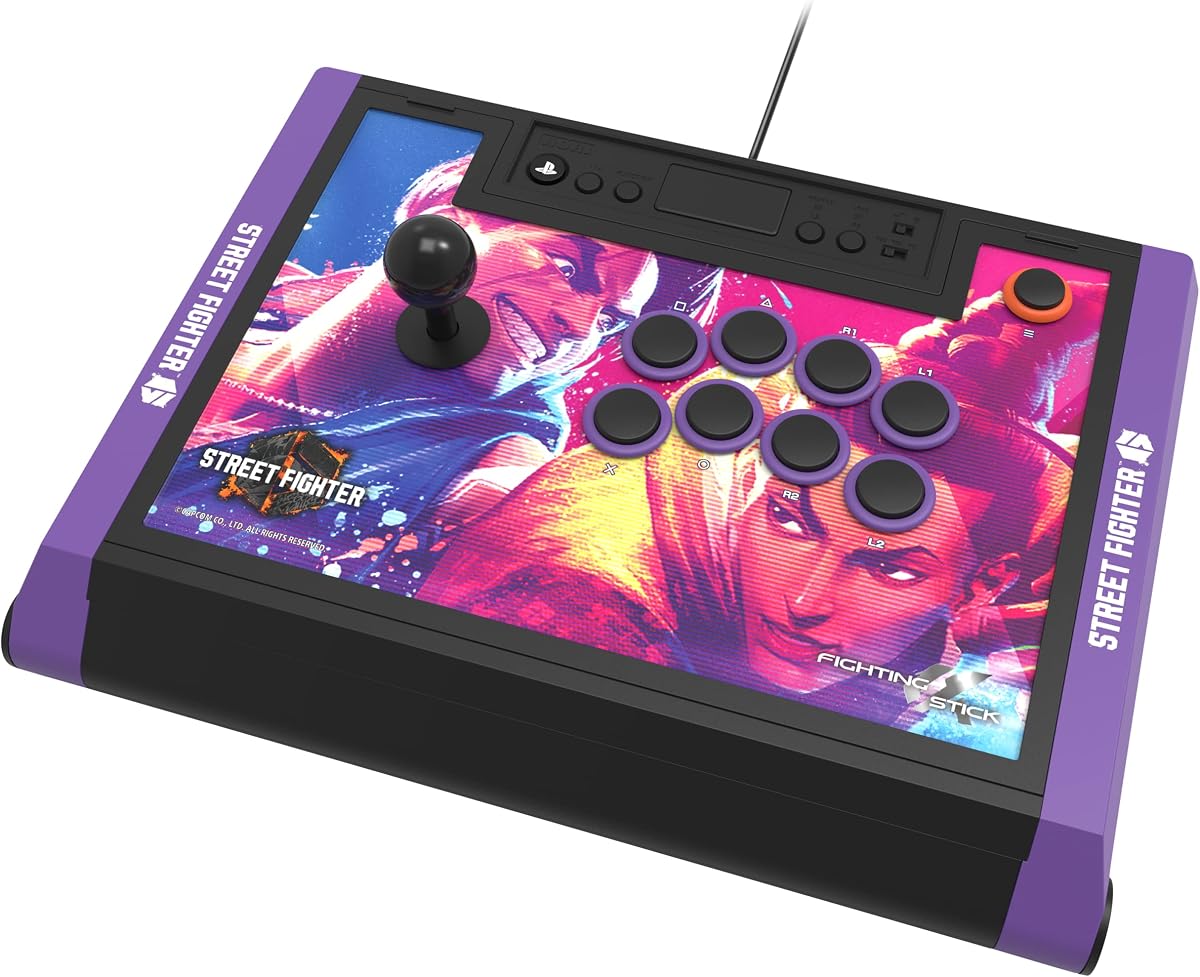
This version of the HORI Alpha features exclusive Street Fighter 6 branding. It shares the same reliable hardware as the standard model. Fans of the game appreciate the themed design and official licensing.
We may earn a commission when you buy through this link, at no additional cost to you.
Its main benefit is the premium artwork alongside tournament-grade build. The Hayabusa parts ensure precision and long-term durability. It opens for maintenance like the standard Alpha.
The higher price reflects the special edition status. Artwork may not suit all tastes long-term. These factors are negligible for SF6 enthusiasts.
This is the ideal choice for Street Fighter 6 fans. It delivers top performance with thematic flair. Choose this if you want to show off your game preference while competing.
The SF6 artwork adds a unique visual identity to your setup. It comes with downloadable images for customization.
Like the standard model it is built for competitive use. The build quality meets tournament standards for reliability.
We may earn a commission when you buy through this link, at no additional cost to you.
The Qanba Q7 Obsidian 2 offers official licensing with a swappable joystick top. It uses OBSF buttons and includes a 3.5mm mic input. Users value the ability to change joystick feel easily.
We may earn a commission when you buy through this link, at no additional cost to you.
Its strength lies in the mix of license and customization. You can swap Sanwa JLF joystick tops for different feedback. It is a solid choice for those who want options.
It lacks wireless connectivity and is costlier than some rivals. The design is more basic than pro-level sticks. These are acceptable trade-offs for a licensed customizable unit.
This stick is perfect for PS5 players wanting variety. It balances official support with customization. Buy this if you like the idea of changing joystick styles.
The swappable Sanwa JLF tops allow feel customization. You can change to match your preference without buying new gear.
Official licensing ensures seamless operation on PlayStation consoles. This removes guesswork when setting up your controller.
We may earn a commission when you buy through this link, at no additional cost to you.
The Tekken 8 Edition is another themed version of the HORI Alpha. It carries official licensing and premium Hayabusa components. Tekken fans appreciate the specialized artwork and solid performance.
We may earn a commission when you buy through this link, at no additional cost to you.
Its key strengths mirror the standard Alpha with extra branding. The stick opens for maintenance and supports tournament play. It provides reliable inputs for competitive matches.
The theme may limit broader appeal to other fighting games. Price is higher than generic options. These trade-offs are worth it for fans of the title.
Choose this if you primarily play Tekken 8 on PS5. It delivers top-tier performance with thematic value. It is a strong option for enthusiasts of the series.
The Tekken 8 artwork resonates with fans of the series. It adds visual identity to your gaming setup.
Designed for competitive play this stick meets high standards. Reliability is maintained despite the special edition branding.
We may earn a commission when you buy through this link, at no additional cost to you.
The GuileKeys GK-18 offers a unique leverless design for all-button control. It includes 18 keys and RGB customization options. Users like the low latency and precision it provides.
We may earn a commission when you buy through this link, at no additional cost to you.
Its standout feature is the leverless layout reducing input errors. Hot-swappable switches and OLED screen allow deep customization. The RP2040 chip ensures minimal latency during play.
It needs a converter to work with PS5 which adds steps. The layout takes time to master for some players. These are expected with this specific controller type.
This stick suits players wanting unique precision control. It is highly customizable for personal preference. Choose this if you prefer key inputs over joysticks.
Using buttons for movement reduces input errors significantly. This can improve accuracy during fast-paced combinations.
RGB lighting and OLED screen let you personalize your setup. You can adjust colors and modes to match your style.
We may earn a commission when you buy through this link, at no additional cost to you.
Choosing the right arcade stick involves balancing compatibility, component quality, and budget. This guide explains the factors you should prioritize for a satisfying experience.
Officially licensed peripherals guarantee seamless integration with PS5 systems. These controllers use proprietary authentication protocols that prevent connection errors. Look for Sony or platform certification logos on the box.
Prioritize official licenses to avoid compatibility headaches during matches.
Joysticks and buttons wear out faster with regular use. High-quality components like Sanwa or Hayabusa resist degradation. Check if the stick allows component replacement for longevity.
Select sticks with premium mechanical parts to ensure consistent performance over years.
Solid build quality prevents flex and damage during intense sessions. Metal chassis or reinforced plastic are signs of durability. Reviewing user feedback can reveal structural reliability.
Invest in a sturdy chassis to withstand competitive play conditions.
Wired connections generally offer the lowest latency. Some sticks support Bluetooth or 2.4G wireless for flexibility. Decide based on your preference for cable management versus signal stability.
Choose wired for tournament use and wireless for convenience at home.
Players often swap parts to match play styles. A stick that opens easily saves time and effort. Look for models with swappable tops or panels.
Ensure the stick opens for maintenance to extend its useful lifespan.
Comfortable designs reduce fatigue during long practice sessions. Textured palm rests or proper sizing help prevent strain. Consider the physical layout relative to your hand size.
Prioritize ergonomic features to maintain comfort over extended periods.
Prices vary widely based on materials and licensing. Set a budget before comparing options to narrow choices. Remember that higher prices often reflect better long-term value.
Balance your budget against expected durability and features.
Some sticks include audio jacks, turbo modes, or RGB lighting. These features can enhance or distract from gameplay. Assess what matters most to your specific needs.
Focus on features that directly improve your gameplay experience.
Set up your arcade stick by connecting the USB cable directly to your PS5 console. Ensure any firmware updates are installed for optimal performance and compatibility.
Clean the surface of the stick regularly with a soft dry cloth to remove dust and oils. Use compressed air to clean around buttons and joystick to prevent debris buildup.
Avoid placing drinks near the stick to prevent accidental spills. Store it in a cool dry place when not in use to preserve internal components.
Not all arcade sticks work with PS5. Only those explicitly supporting PS5 or officially licensed will function correctly. Always check product specifications for compatibility before purchasing.
A wired connection is generally better due to lower latency and no battery requirements. Wireless options offer convenience but may introduce slight delays. Wired is preferred for competitive play.
Many arcade sticks allow customization of parts and panels. Models like the HORI Alpha open easily for maintenance and swaps. Verify the specific model supports your desired changes.
Official PS5 licensed sticks usually do not need drivers. They use standard console protocols for plug-and-play use. Third-party models might need firmware updates on PC.
High-quality arcade sticks can last several years with proper care. Components like buttons and joystick may need replacement. Regular maintenance extends their usable lifespan significantly.
Leverless sticks offer precision but require a learning curve. They are preferred by some competitive players. Traditional joysticks remain standard for most casual users.
Some universal sticks require converters for Xbox. The F500 Magic Boots bundle simplifies PS5 use. Verify Xbox compatibility details in the product data before buying.
Prices reflect build quality and long-term value. Higher-end models often save money over time by avoiding replacements. Consider usage frequency to decide if costs justify benefits.
We have reviewed ten top arcade sticks offering licensed and versatile options. The HORI Alpha remains a top choice for reliability and official support.
Prioritize component quality and licensing when selecting your controller. These factors ensure consistent performance and compatibility with PS5 titles.
Prices and availability can fluctuate frequently online. Always check current product details before making your purchase to confirm features.