
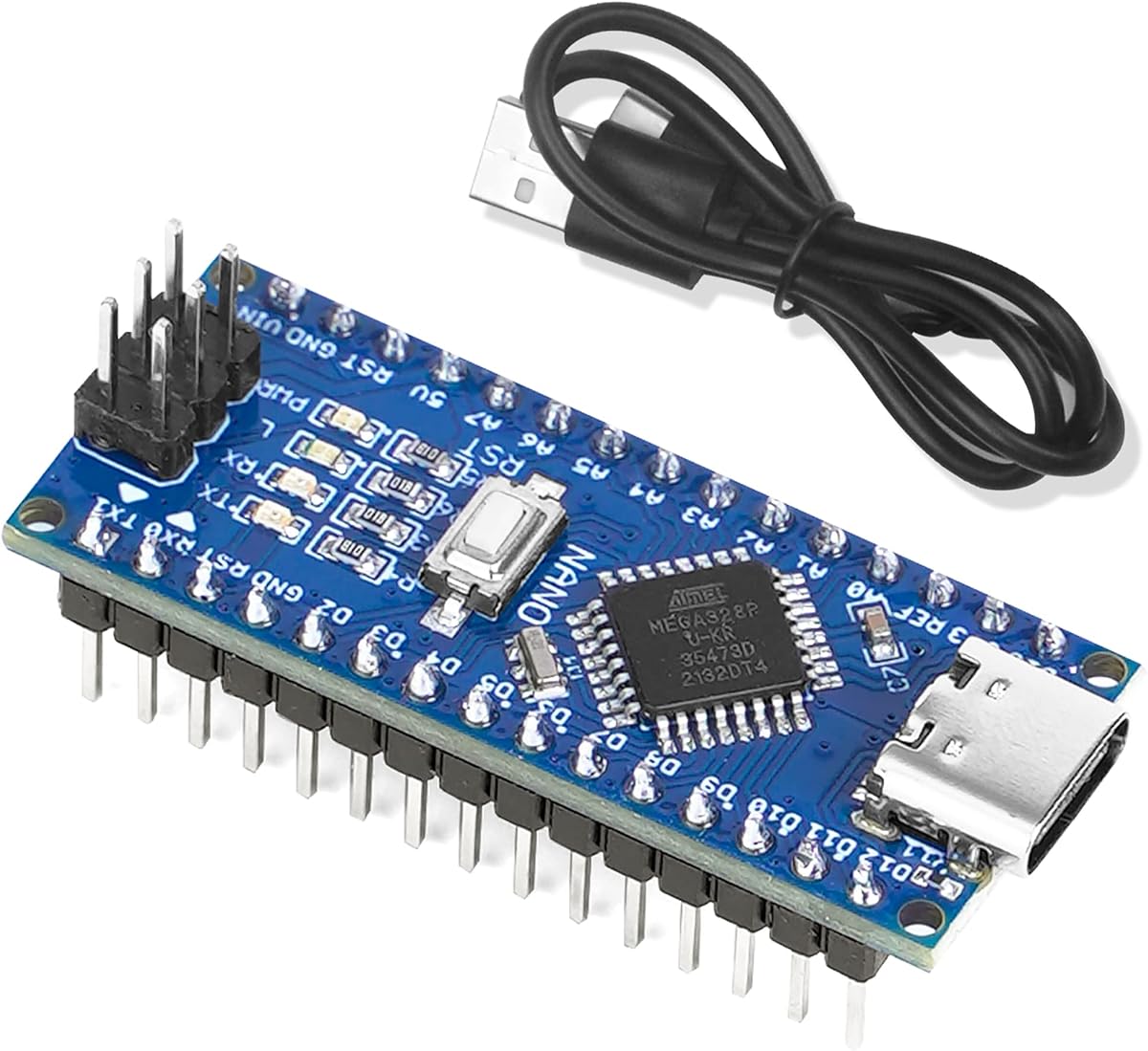
2Pcs Nano V3.0 Board
4.5Editor score
ATmega328P and CH340G chip
USB-C power socket included
Fully compatible with Arduino IDE
This expert guide compares the top 10 Arduino Nano Board options available in October 2026 for performance, features, and value.
The Arduino Nano Board remains a cornerstone for makers and engineers needing compact microcontroller power. Its small footprint and robust feature set make it ideal for embedded systems, robotics, and IoT projects where space is limited but functionality is paramount.
We evaluated ten leading models based on processor capabilities, connectivity options, build quality, and community support. Each product was assessed for compatibility with the Arduino IDE, power management efficiency, and suitability for both beginner prototyping and advanced production environments.
Each pick highlights unique strengths such as USB-C integration, wireless capabilities, or enhanced memory. Note that pricing and availability fluctuate frequently, so always verify current details on the product page before making your final purchasing decision for your specific project needs.
4.5Editor score
4.6Editor score

4.5Editor score
The following comparison table outlines the key specifications and features of the top ten Arduino Nano Board models to help you quickly identify the best fit for your project requirements.


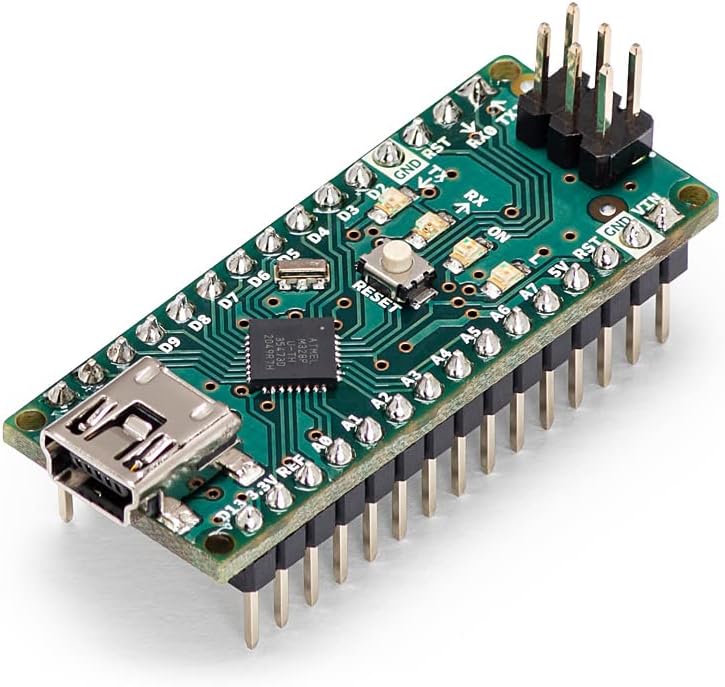
The Arduino Nano [A000005] stands out as the quintessential choice for developers seeking reliability and compact design. With a 4.6 rating, it offers a balanced mix of power and portability suitable for most embedded tasks.
We may earn a commission when you buy through this link, at no additional cost to you.
Its ATmega328P microcontroller provides ample processing power for standard logic operations. The 22 digital I/O pins and 8 analog inputs allow for extensive sensor integration without external multiplexers.
While the mini-USB port is less modern than USB-C, it remains widely supported. The board's small form factor ensures it fits easily into wearables and portable devices without compromising on functionality.
Choose this board if you need a proven solution with vast community resources. It is ideal for students, hobbyists, and engineers who prioritize stability and compatibility over cutting-edge features.
The small 45x18mm footprint allows embedding in space-constrained projects like wearables or robotics where larger boards would not fit.
Full compatibility with the Arduino IDE ensures seamless code uploads and access to thousands of libraries for rapid prototyping and development.
We may earn a commission when you buy through this link, at no additional cost to you.
This three-pack offers exceptional value for projects requiring multiple units. It mirrors the original Nano functionality while providing a budget-friendly alternative for extensive prototyping phases.
We may earn a commission when you buy through this link, at no additional cost to you.
The CH340G chip ensures reliable serial communication on modern systems. Three boards allow for simultaneous testing or distribution across a classroom without compromising on performance metrics.
While it requires driver installation for the CH340G chip, this is a minor setup step. The breadboard-friendly design makes it easy to integrate into existing circuits without soldering.
Ideal for educators or teams needing multiple nodes. This pack ensures you have spares ready for any unexpected hardware failures during development cycles.
Buying three boards at once reduces per-unit cost significantly compared to purchasing single units from official retailers.
The CH340G chip requires a simple driver install but works seamlessly across Windows, Mac, and Linux once configured.
We may earn a commission when you buy through this link, at no additional cost to you.
ELEGOO provides a modern twist on the classic Nano with USB-C connectivity. The presoldered headers save significant time during assembly and ensure a clean connection for breadboard testing.
We may earn a commission when you buy through this link, at no additional cost to you.
This pack includes three boards and a cable, making it ready for immediate use. The 32KB flash allows for standard logic operations and complex data logging tasks.
Users should note the driver setup for the CH340 USB controller. However, once installed, the upload process is smooth and reliable for daily development work.
Perfect for projects needing USB-C compatibility. This board bridges the gap between legacy Nano compatibility and modern connector standards without requiring adapter cables.
Headers arrive soldered on the board which eliminates the need for manual soldering and protects against damage during initial setup.
Using USB-C provides reversible connectivity and aligns with newer computer ports reducing the need for adapter cables.
We may earn a commission when you buy through this link, at no additional cost to you.
The Nano Every represents a significant step up in performance for the Nano family. Powered by the ATmega4809, it offers more memory and processing power without increasing physical size.
We may earn a commission when you buy through this link, at no additional cost to you.
With 48KB of flash and 6KB SRAM, it handles larger libraries and complex algorithms more efficiently. This is ideal for projects requiring robust data processing or extensive code logic.
Its USB-C port ensures modern connectivity and faster upload speeds. The board maintains compatibility with existing Nano shields to ensure a smooth transition for legacy designs.
Choose this for demanding embedded tasks. It balances cost and performance effectively, making it a smart upgrade for professionals needing more capability than the classic Nano.
The expanded memory allows for storing larger codebases and more complex variable structures necessary for advanced automation projects.
USB-C ensures you can use modern cables and ports directly without needing adapters for power or data transfer.
We may earn a commission when you buy through this link, at no additional cost to you.
This board merges the Nano form factor with the powerful ESP32-S3 microcontroller. It brings native Wi-Fi and Bluetooth connectivity essential for modern IoT applications.
We may earn a commission when you buy through this link, at no additional cost to you.
The ESP32-S3 dual-core processor runs up to 240 MHz, offering superior computational power. MicroPython compatibility allows for easier scripting and rapid prototyping cycles.
With HID support, you can create custom input devices like keyboards or mice. USB-C ensures modern connection standards for power and programming.
Ideal for wireless sensor networks and smart devices. It is the go-to choice when connectivity is a core requirement of your project design.
Built-in Wi-Fi and Bluetooth allow direct connection to networks and mobile devices without extra modules.
Developers can use Python for logic instead of C++ making development faster and accessible for a wider audience.
We may earn a commission when you buy through this link, at no additional cost to you.
This two-pack offers a highly affordable entry point into Arduino development. It features the CH340G chip for reliable USB-C connectivity across all major operating systems.
We may earn a commission when you buy through this link, at no additional cost to you.
The inclusion of USB cables adds immediate value to the purchase. With 14 digital and 6 analog pins, it handles standard sensor and actuator tasks effectively.
While it is a third-party board, the functionality remains compatible with the Arduino IDE. It serves as an excellent option for educational settings where budget constraints are significant.
Choose this if you need multiple units cheaply. It balances cost and performance well enough for learning basics or prototyping before finalizing a design.
The price per unit is significantly lower than official boards making it accessible for students and large scale projects.
Each pack includes USB cables which saves extra costs and ensures you have what you need to start coding.
We may earn a commission when you buy through this link, at no additional cost to you.
A great option for classroom distribution this three-pack includes USB-C ports and cables for modern connectivity. The board auto-detects power sources automatically simplifying setup for beginners.
We may earn a commission when you buy through this link, at no additional cost to you.
It maintains compatibility with standard Arduino libraries ensuring code portability. The quartz oscillator ensures stable timing for projects requiring precise frequency control.
While basic in build, it performs reliably for standard logic operations. This makes it a practical choice for bulk needs where cost is a primary factor over aesthetics.
Ideal for educators needing consistent units. The three-pack ensures you have enough for group activities without overspending on hardware costs.
The board automatically detects and switches power sources so you do not need manual jumpers for different voltage inputs.
A dedicated 16MHz quartz oscillator provides reliable timing for tasks requiring accurate delays or frequency outputs.
We may earn a commission when you buy through this link, at no additional cost to you.
The Nano R4 is a premium evolution featuring the Renesas RA4M1 microcontroller with 48MHz clock speed. It offers massive memory and connectivity options for complex applications.
We may earn a commission when you buy through this link, at no additional cost to you.
Pre-soldered headers allow instant connection to breadboards. The Qwiic connector simplifies adding sensors without complex wiring which accelerates prototyping cycles.
With a programmable RGB LED it provides built-in visual feedback. Castellated edges make it perfect for direct PCB embedding in custom manufacturing projects.
Choose this for advanced prototyping and production. It provides the reliability and features needed for professional and educational environments requiring high performance.
The Qwiic connector enables quick connection to I2C devices without wiring reducing setup time and complexity significantly.
The programmable RGB LED allows you to indicate status changes without external components simplifying debugging and user interaction.
We may earn a commission when you buy through this link, at no additional cost to you.
This version offers flexibility with loose pins for custom mounting. It retains all the high performance features of the R4 series while allowing direct PCB integration.
We may earn a commission when you buy through this link, at no additional cost to you.
The castellated edges enable surface mounting without headers. This is ideal for embedding into custom enclosures or integrating into a dedicated PCB design.
While it requires soldering work, it ensures a more robust mechanical connection. The Qwiic connector and RGB LED remain available for expansion and status feedback.
Best for engineers designing custom hardware. It provides the flexibility to create compact, integrated devices without the bulk of standard headers.
Castellated edges allow the board to be soldered directly onto your custom PCB reducing overall size and improving stability.
Included loose pins let you choose your header style or orientation for specialized project requirements.
We may earn a commission when you buy through this link, at no additional cost to you.
This module offers a compact standalone solution for specific integration needs. It uses the ATmega328P-AU MCU with USB-C support for modern connectivity options.
We may earn a commission when you buy through this link, at no additional cost to you.
Power auto switching ensures you do not need jumpers for different voltage inputs. It is fully compatible with Windows, Mac, and Linux operating systems.
While it is a single unit, it provides excellent performance for small projects. Its design is optimized for breadboard handling and quick integration into prototypes.
Ideal for projects needing a single compact controller. It balances modern features like USB-C with the simplicity of classic Nano logic.
The module design is optimized for tight spaces allowing you to use the core functionality without unnecessary extra bulk.
Automatic power source detection lets you use USB-C or external power without manual configuration or jumper settings.
We may earn a commission when you buy through this link, at no additional cost to you.
Selecting the right Arduino Nano Board depends on your project's connectivity, memory, and power needs. Consider these key factors to ensure compatibility and performance.
The ATmega328P is the classic choice offering 32KB flash and 2KB SRAM. For more complex tasks consider the Nano Every with ATmega4809 which provides 48KB flash and 6KB SRAM.
Higher memory allows for storing larger libraries and more complex data structures needed for advanced automation.
Choose between Mini USB and USB-C ports based on your current setup. USB-C offers reversibility and aligns with modern devices.
If wireless is essential look at models like the Nano ESP32 which include built-in Wi-Fi and Bluetooth modules.
Most boards support 5V via USB and 7-12V external power. Ensure your project power source matches these requirements.
Automatic power switching boards eliminate the need for jumpers making power source selection easier.
Soldered headers save time but add height. Loose pins allow for custom mounting but require soldering.
Pre-soldered headers are best for quick prototyping while loose pins suit custom PCB embedding.
Ensure the board works with the Arduino IDE and existing libraries. Most Nano variants are fully compatible.
Check for specific chipsets like CH340 or FT232 which may require specific drivers on your operating system.
Nano boards are generally 45x18mm which fits standard breadboards. Check for additional features that might increase the profile.
Castellated edges allow for direct PCB integration if space is extremely constrained.
Official boards cost more but guarantee consistency. Third-party options often cost less but may have minor build variances.
Choose bulk packs for classroom use to reduce costs per unit significantly.
Look for boards with Qwiic connectors or RGB LEDs if you plan to add sensors or provide visual feedback.
Standard pins allow connection to shields but integrated connectors simplify setup for new users.
Connect your board to your computer using a USB cable. Ensure you have the correct drivers installed so the IDE can recognize the serial port.
Upload your sketches via the Arduino IDE. Always verify your code before uploading to prevent potential hardware issues or incorrect behavior.
Store boards in a dry static-free environment. Avoid exposure to water or excessive heat to maintain longevity and performance.
The Nano Every features the ATmega4809 microcontroller with more memory (48KB Flash) and faster speed compared to the classic Nano's ATmega328P. It also includes USB-C connectivity while the classic model uses Mini-USB.
Yes, boards using CH340 chips require a specific driver to work on Windows. Mac and Linux users usually find the driver included or automatically detected by the OS.
Yes, the Nano is highly suitable for battery-powered projects. You can power it via the VIN pin using 7-12V external power or remove voltage regulators for lower consumption.
Yes, USB-C Nano boards are fully compatible with existing Arduino sketches. The pinout and logic remain largely the same, allowing you to upload code just like standard models.
The Arduino Nano ESP32 is the best choice for IoT because it includes built-in Wi-Fi and Bluetooth modules for wireless connectivity without external add-ons.
Official Arduino boards have a specific serial number printed and use FT232 chips. Third-party boards typically use CH340 chips and vary in packaging.
Most Nano shields work with the R4, but you should check pin compatibility since the underlying microcontroller has changed. The R4 maintains most standard connections.
Yes, you can replace a Nano with a compatible third-party or newer version as long as the pinout matches. This allows for maintenance or performance upgrades easily.
Choosing the right Arduino Nano Board depends on your specific project requirements. Whether you need the classic reliability of the ATmega328P or the modern connectivity of the R4 or ESP32 models, there is an option for everyone.
Prioritize features like USB-C connectivity or built-in wireless if your project demands it. Consider bulk packs for education and official boards for production quality.
Remember to check current availability and pricing on the product pages as details can change. This ensures you get the best value and performance for your development needs.